> For clean Markdown of any page, append .md to the page URL.
> For a complete documentation index, see https://docs.stereolabs.com/llms.txt.
> For AI client integration (Claude Code, Cursor, etc.), connect to the MCP server at https://docs.stereolabs.com/_mcp/server.
# ZED Nodelets
> **Warning**
>
> **The ZED ROS Wrapper packages are no longer maintained** because ROS 1 reached [end-of-life (EOL) on 2025-05-31](https://www.ros.org/blog/noetic-eol/) with the final Noetic release.
>
> We recommend upgrading to [ROS 2](/docs/integrations/ros-2) to take advantage of the latest ZED SDK features for robotics applications.
The `zed_wrapper` package contains the standalone ZED Wrapper node that can be started as is using the provided launch files, as described in the [ZED Wrapper Node documentation](/docs/integrations/ros/zed-node/).
But the ZED Wrapper has been designed to take maximum advantage of the [nodelet package](http://wiki.ros.org/nodelet), in order to run *multiple algorithms in the same process with zero copy transport between algorithms*.
The core of the ZED Wrapper is indeed the `ZEDWrapperNodelet` nodelet, available in the [`zed_nodelets` package](https://github.com/stereolabs/zed-ros-wrapper/tree/master/zed_nodelets) that provides the interface between the ZED SDK and the ROS environment.
## Starting a ZED nodelet
A [nodelet manager](http://wiki.ros.org/nodelet/Tutorials/Running%20a%20nodelet#Bring_up_a_manager) is required to start the `ZEDWrapperNodelet`. It can be started manually from the command line:
```bash
rosrun nodelet nodelet manager __name:=zed_nodelet_manager
```
Now the `ZEDWrapperNodelet` nodelet can be loaded inside the new `zed_nodelet_manager` nodelet manager:
```bash
rosrun nodelet nodelet load zed_nodelets/ZEDWrapperNodelet zed_nodelet_manager __name:=zed_nodelet
```
The nodelet works exactly like a standalone ZED node. You can use the command `rosnode list` to verify that it is correctly running together with the `zed_nodelet_manager`:
```bash
rosnode list
/rosout
/zed_nodelet
/zed_nodelet_manager
```
It is also possible to start the `ZEDWrapperNodelet` nodelet as a standalone node, but by doing so you will lose all the advantages of a nodelet that will be shown next:
```bash
rosrun nodelet nodelet standalone zed_nodelets/ZEDWrapperNodelet
```
> **Note**
>
> This is exactly what's done internally by the [ZED Node](https://github.com/stereolabs/zed-ros-wrapper/blob/master/zed_wrapper/src/zed_wrapper_node.cpp), using the nodelet C++ APIs.
## ZED nodelet parameters
When started using one of the two methods illustrated above, the `ZEDWrapperNodelet` nodelet is configured using the default parameters. We provide a launch file that allows you to load custom parameters using the YAML files described in the [ZED Wrapper Node documentation](/docs/integrations/ros/zed-node/#zed-parameters):
First start a nodelet manager:
```bash
rosrun nodelet nodelet manager __name:=zed_nodelet_manager
```
then launch the nodelet:
ZED:
```bash
roslaunch zed_wrapper zed_camera_nodelet.launch camera_model:=zed
```
ZED Mini:
```bash
roslaunch zed_wrapper zed_camera_nodelet.launch camera_model:=zedm
```
ZED 2:
```bash
roslaunch zed_wrapper zed_camera_nodelet.launch camera_model:=zed2
```
ZED 2i:
```bash
roslaunch zed_wrapper zed_camera_nodelet.launch camera_model:=zed2i
```
ZED X:
```bash
roslaunch zed_wrapper zed_camera_nodelet.launch camera_model:=zedx
```
ZED X Mini:
```bash
roslaunch zed_wrapper zed_camera_nodelet.launch camera_model:=zedxm
```
## The power of nodelets
To really perceive the power of the nodelet package it is necessary to load more nodelets inside the same `nodelet manager`, that is inside the same *process*. In this way, the different nodelets can exploit the advantages of the intra process communication that allows zero-copy passing of data between nodelets.
Why is this important? The ZED nodelet publishes images and point clouds at high frequency. Subscribing to these kinds of topics using the standard node serialized communication requires a lot of memory copies that generate latency and requires more computational power. Instead, using zero-copy, no memory copy is required as the memory is simply *shared* between the nodelets that are contained in the same nodelet manager process. Furthermore, intra-process communication allows a reduction of the network traffic for nodes running on the same machine.
## Examples
To demonstrate how to use the ZED nodelet to exploit the power of nodelets we provide two examples:
* topics synchronization and mux
* depth image to 2D laser scan
## Topics synchronization
Sometimes it is useful to synchronize and mux a few topics in one single topic using their timestamp, for example, to save a rosbag or to guarantee that all the topics published in the same instant are received on the other side of a network.
To perform this operation we provide the nodelet `zed_nodelets/RgbdSensorsSyncNodelet` that allows the synchronization of RGB, Depth, IMU, and Magnetometer information in a single topic with the custom message type `RGBDSensors`.
### Custom message: RGBDSensors
The custom message `RGBDSensors` is defined in the package `zed_interfaces` as:
```bash
# Header
Header header
# CameraInfo
sensor_msgs/CameraInfo rgbCameraInfo
sensor_msgs/CameraInfo depthCameraInfo
# Raw
sensor_msgs/Image rgb
sensor_msgs/Image depth
# IMU
sensor_msgs/Imu imu
# Magnetometer
sensor_msgs/MagneticField mag
```
This message allows publishing visual/depth information (RGBD) synchronized with inertial and orientation data.
### Parameters
The nodelet can be configured using the following parameters, the file `sync.yaml` with the definition of all the parameters and their default values is provided in the `zed_wrapper` package:
| Parameter | Description | Value |
| ------------------ | ------------------------------------------------------------------------------------------------------------------------------------------------------------------------------------------------------------------------------------------------------------------- | ----------------------------------------------------------- |
| zed\_nodelet\_name | The name of the ZED nodelet publishing the topics to be synchronized | string, default=`zed_node` (overwritten by the launch file) |
| approx\_sync | Use approximate synchronization for the input topics. If `false` all the messages must have the same timestamp, this is almost impossible if subscribing also to IMU and Magnetometer topics and the parameter `sensors_timestamp_sync` is false in the ZED nodelet | bool, default=`true` |
| queue\_size | Size of message queue for each synchronized topic | int, default=`600` |
| sub\_imu | Synchronize IMU messages | bool, default=`true` |
| sub\_mag | Synchronize Magnetometer messages | bool, default=`true` |
### Start the nodelet
You can start the `RgbdSensorsSyncNodelet` nodelet and the `ZEDWrapperNodelet` nodelet in the same nodelet manager easily using the `zed_sync_nodelet.launch` launch file provided in the `zed_nodelet_example` package:
ZED:
```bash
roslaunch zed_nodelet_example zed_sync_nodelet.launch camera_model:=zed sub_imu:=false sub_mag:=false
```
> **Note**
>
> The ZED camera does not provide inertial and magnetometer information, so we must disable the subscription to these topics
ZED Mini:
```bash
roslaunch zed_nodelet_example zed_sync_nodelet.launch camera_model:=zedm sub_mag:=false
```
> **Note**
>
> The ZED Mini camera does not provide magnetometer information, so we must disable the subscription to this topic
ZED 2:
```bash
roslaunch zed_nodelet_example zed_sync_nodelet.launch camera_model:=zed2
```
ZED 2i:
```bash
roslaunch zed_nodelet_example zed_sync_nodelet.launch camera_model:=zed2i
```
### The launch file explained
A brief description of the main part of the `zed_sync_nodelet.launch` file.
Setting the name of the nodelet manager using the camera name as a prefix:
```xml
```
The nodelet manager, the `RgbdSensorsSyncNodelet` nodelet and the `ZEDWrapperNodelet` nodelet are included in the same namespace that takes the name from the camera name parameter:
```xml
[...]
```
Starting the nodelet manager:
```xml
```
Loading the `ZEDWrapperNodelet` nodelet:
```xml
```
Loading the `RgbdSensorsSyncNodelet` nodelet:
```xml
```
The `RgbdSensorsSyncNodelet` nodelet loads the parameters directly from the `sync.yaml` file as described above, but the `zed_nodelet_name` parameter value is overwritten to take automatically the name set for the `ZEDWrapperNodelet` nodelet that publishes the topics to be synchronized.
### Demux the topics
An `RGBDSensors` message cannot be used by standard ROS nodes. You must create your own node that subscribes to it and extracts all the available data.
To make it easier to access the information stored in the `RGBDSensors` message, we provide a demux nodelet: `RgbdSensorsDemuxNodelet`.
You can start the demux nodelet as a standalone node using the following command:
```bash
rosrun nodelet nodelet standalone zed_nodelets/RgbdSensorsDemuxNodelet __name:=demux_nodelet rgbd_sens:=
```
or you can use it inside a nodelet manager to exploit zero-copy if you have other nodelets that can be combined together to process the provided data.
> **Note**
>
> The `RgbdSensorsDemuxNodelet` subscribes to a topic called `rgbd_sens`. It is important to **remap** the name of this topic to correctly match the name of the available topic to demux, i.e. `/zed/zed_nodelet_sync/rgbd_sens`.
## Depth image to 2D laser scan
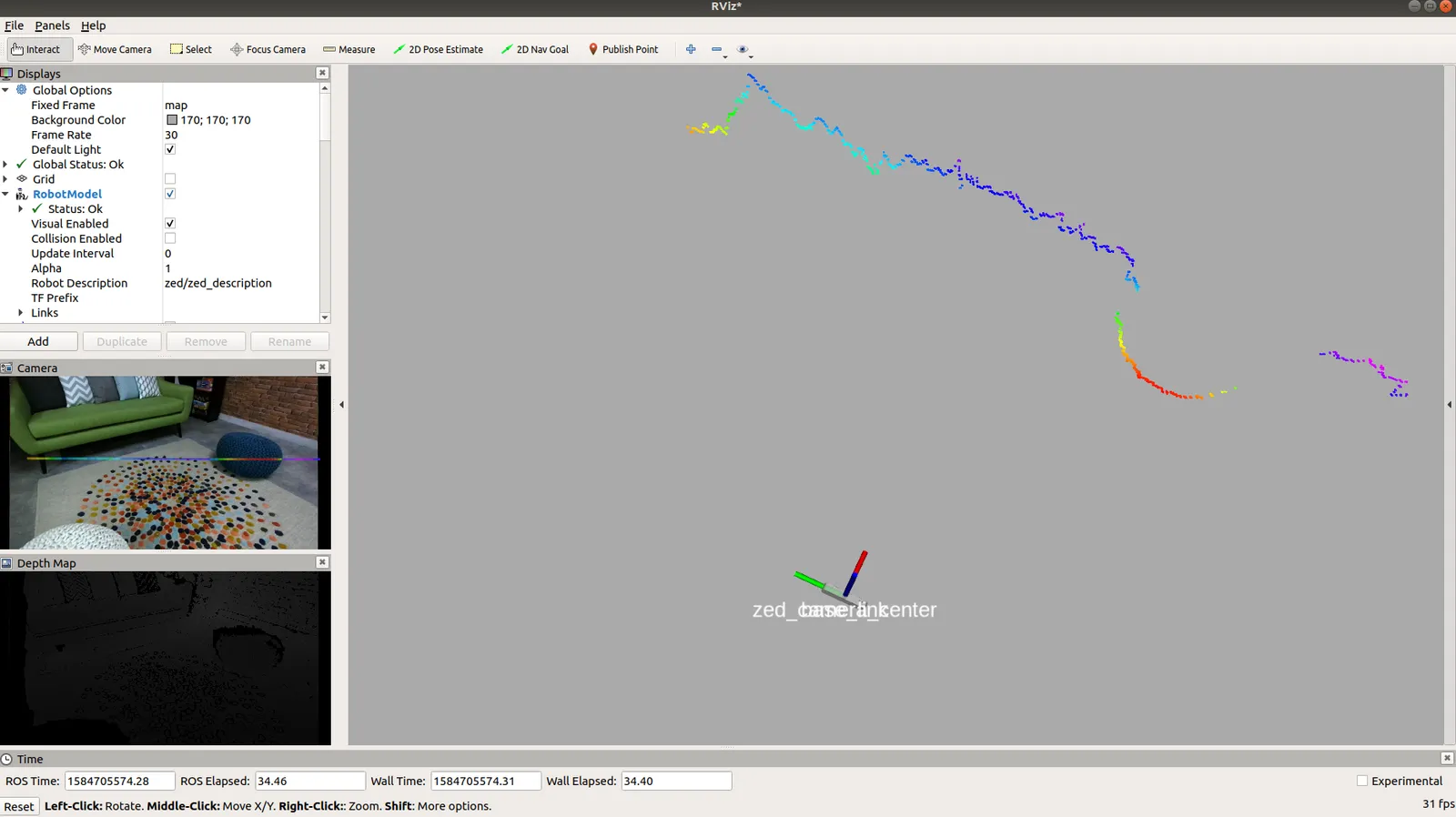
Most of the mapping packages included in ROS require 2D laser scan information to work (see [gmapping](http://wiki.ros.org/gmapping), [cartographer](https://google-cartographer-ros.readthedocs.io/en/latest/), [amcl](http://wiki.ros.org/amcl)). The easiest way to generate a virtual 2D laser scan from 3D information is to use the [depthimage\_to\_laserscan](http://wiki.ros.org/depthimage_to_laserscan) package and the provided `DepthImageToLaserScanNodelet` nodelet.
### Start the nodelet
We provide the `zed_laserscan_nodelet.launch` launch file in the `zed_nodelet_example` package to easily start the `ZEDWrapperNodelet` and the `DepthImageToLaserScanNodelet` in the same nodelet manager:
ZED:
```bash
roslaunch zed_nodelet_example zed_laserscan_nodelet.launch camera_model:=zed
```
ZED Mini:
```bash
roslaunch zed_nodelet_example zed_laserscan_nodelet.launch camera_model:=zedm
```
ZED 2:
```bash
roslaunch zed_nodelet_example zed_laserscan_nodelet.launch camera_model:=zed2
```
ZED 2i:
```bash
roslaunch zed_nodelet_example zed_laserscan_nodelet.launch camera_model:=zed2i
```
### The launch file explained
A brief description of the main part of the `zed_laserscan_nodelet.launch` file.
Setting the name of the nodelet manager using the camera name as a prefix:
```xml
```
The nodelet manager, the `DepthImageToLaserScanNodelet` nodelet and the `ZEDWrapperNodelet` nodelet are included in the same namespace that takes the name from the camera name parameter:
```xml
[...]
```
Starting the nodelet manager:
```xml
```
Loading the `ZEDWrapperNodelet` nodelet:
```xml
```
Loading the `DepthImageToLaserScanNodelet` nodelet:
```xml
```
The `DepthImageToLaserScanNodelet` requires the following parameters to be set to correctly work:
* `scan_height`: The number of pixel rows to use to generate the laser scan. For each column, the scan will return the minimum value for those pixels centered vertically in the image.
* `output_frame_id`: The frame id of the laser scan. For point clouds coming from an "optical" frame with Z forward, this value should be set to the corresponding frame with X forward and Z up.
* `range_min`: The minimum range to return in meters. Ranges less than this will be output as -Inf.
Finally, we must remap the input topic `image` so `DepthImageToLaserScanNodelet` can subscribe to the correct `sensor_msgs/Image` topic providing depth information: `depth/depth_registered`, with the ZED nodelet name as a prefix.