

Body Tracking Overview
The body tracking module focuses on detecting and tracking a person’s bones. A detected bone is represented by its two endpoints, also called keypoints. The ZED camera can provide 2D and 3D information on each detected keypoint. Furthermore, it produces the local rotation between neighboring bones.
This module requires a stereo camera equipped with an inertial sensor (IMU), such as the ZED 2/2i, ZED Mini, ZED X, ZED X Mini, ZED X Nano. The following cameras are not supported:
- The original ZED (out of production), which has no built-in IMU.
- The ZED X One GS/4K/S cameras, which are monocular.
How It Works
The overall process is very similar to the ZED SDK Object Detection module. They share some output information, such as the 3D position and 3D velocity of each person. The body tracking module also uses a neural network for keypoint detection and then relies on the depth and positional tracking modules of the ZED SDK to compute the final 3D position of each keypoint. The ZED SDK supports multiple body formats:
Body 18
Body 34
Body 38
The BODY_18 body format contains 18 keypoints following the COCO18 skeleton representation.
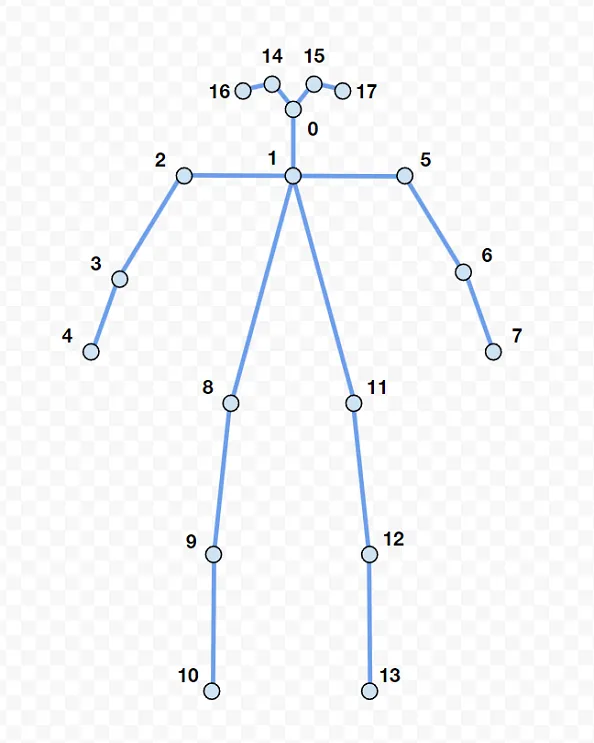
Each keypoint is indexed by an integer from 0 to 17:
About Keypoint Landmarks
Keypoint names such as LEFT_SHOULDER or LEFT_KNEE identify the joint each keypoint represents, but they are not metrologically calibrated anatomical landmarks. Each keypoint’s position is the output of a neural network trained to estimate human pose from the camera image and depth data, so it is a learned approximation of the joint’s visible location, not a precise, fixed point such as the acromion or the glenohumeral joint center. This is a limitation common to all camera-based (RGB or RGB-D) pose estimation systems, since the deep joint center of a real joint (for example, the shoulder’s glenohumeral joint) cannot be directly observed from any external camera view.
For applications where absolute joint-center accuracy matters, such as biomechanics or clinical research, treat the ZED SDK skeleton as a consistent kinematic model rather than as calibrated anatomical landmarks, and validate keypoint accuracy against ground truth (for example, marker-based motion capture) for your specific setup and population.
The ZED SDK can output 3 levels of information: raw 2D/3D body detection, 3D body tracking and 3D body fitting.
2D/3D Body detection
The ZED SDK first uses the ZED camera image to infer all 2D bones and keypoints using neural networks. The SDK depth module and positional tracking module are then used together to extract the correct 3D position of each bone and keypoint.
3D body tracking
If tracking is enabled, the ZED SDK will assign an identity to each detected body over time. At the same time, by filtering the raw body detections, it will output a more stable 3D body estimation.
3D body fitting
Moreover, a user can enable fitting to unlock even more information about each identity. The fitting process uses the history of each tracked person to deduce all missing keypoints, relying on the human kinematic constraints used by the body tracking module. It can also extract the local rotation between a pair of neighboring bones by solving the inverse kinematics problem. This data is compatible with common avatar animation software, for example. Below is an example where BODY_FORMAT::BODY_34 was used to animate an avatar in Unreal.
Detection Outputs
Each detected person is stored as a structure in the ZED SDK called sl.BodyData.
See Understanding Joint Orientations for details on how these rotations are defined and how to compose them into world-space orientations.
For more information on Body Tracking, see the Using the API page.