

Setting the Region of Interest in ROS 2
The ZED SDK provides a “Region of Interest” feature for robotics applications: an area to focus on for all SDK processing, discarding other parts.
When mounting a ZED on a robot, parts of the robot itself are often statically visible in the camera’s field of view. This fact affects the depth extraction and performance of the positional tracking algorithms because part of the image will be stable even if the camera is moving.
The region of interest can be used to ignore these non-useful parts of the frame in the ZED SDK pipeline thus improving the overall performance of the ZED SDK algorithms run by the ZED ROS 2 Wrapper.
How to use it
To set the region of interest of the ZED SDK processing it is necessary to call the API function sl::Camera::setRegionOfInterest which requires as an input parameter an image mask of type sl::Mat which sets the valid pixel zones of the frames captured, all the pixels with 0 (zero) as value are ignored.
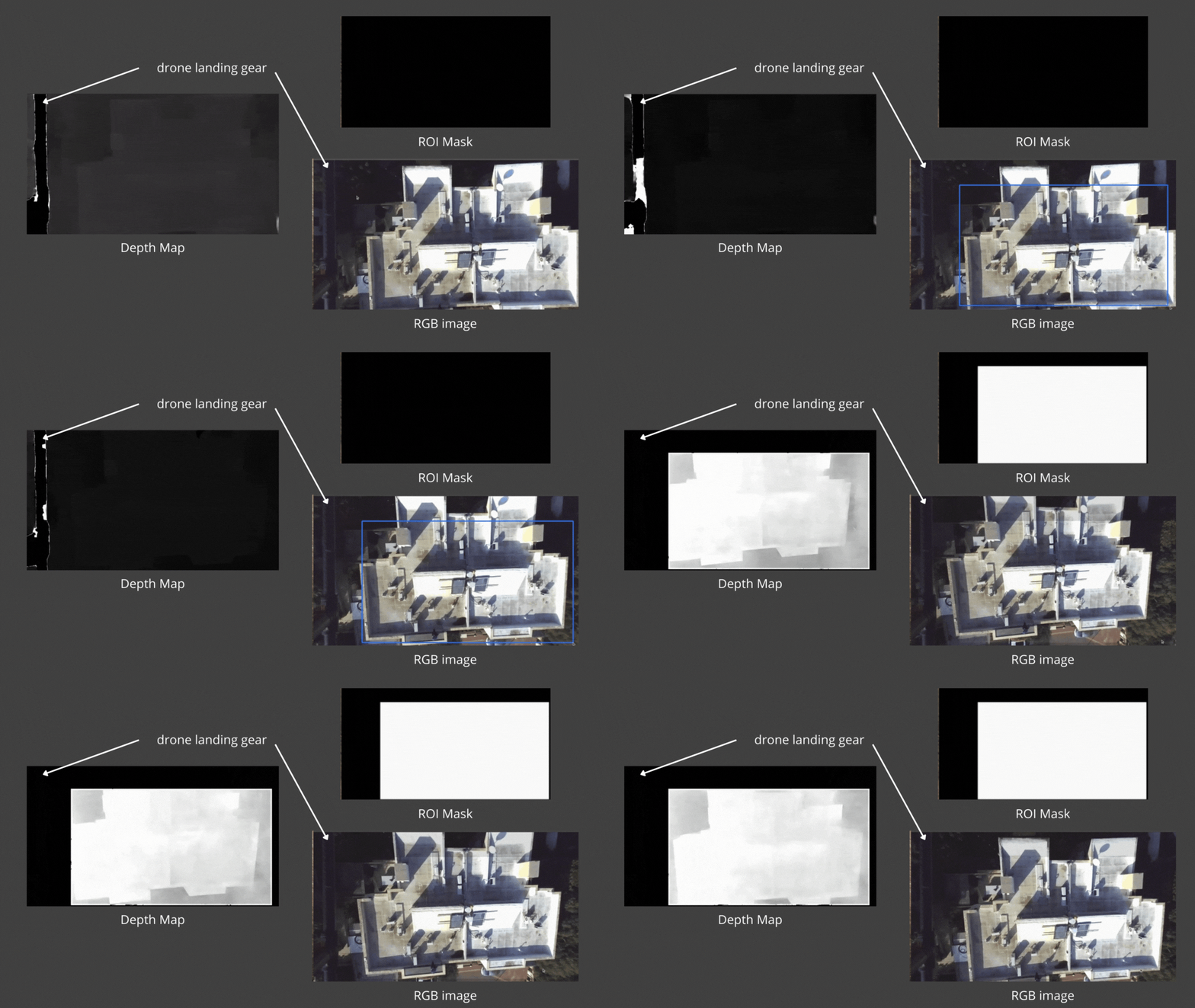
The ZED ROS 2 Wrapper automatically creates the required sl::Mat starting from a parameter describing a polygon that contains the region of the image to be used during the data processing.
The Region of Interest can be generated automatically by the ZED SDK, set when the node starts through a node parameter, or set at runtime by calling a ROS 2 service.
All the related parameters live in the region_of_interest namespace of common_stereo.yaml. See the Region of Interest parameters reference for the full list.
Automatic generation
Set region_of_interest.automatic_roi to true to let the ZED SDK detect the parts of the robot in the field of view and remove them from the processing. Two parameters tune the detection:
region_of_interest.depth_far_threshold_meters: the maximum distance at which an object is still considered part of the robot.region_of_interest.image_height_ratio_cutoff: the portion of the image to consider, starting from the bottom. The default0.5considers only the lower half, which filters out the sky.
When automatic_roi is enabled the value of manual_polygon is ignored.
Node parameter
The node parameter used to set the region of interest manually is region_of_interest.manual_polygon, a string containing the list of the normalized coordinates of the polygon.
We use normalized coordinates so it is possible to change the resolution of the images without necessarily changing the definition of the parameter of the Region of Interest.
For example, to define a rhomboid-shaped Region of Interest, with the vertices in the central quarter of the frame, set the parameter as follows:
To keep the Region of Interest equal to the full image the polygon must be empty:
or
Selecting the modules
Each of the following parameters enables the Region of Interest for one module. They all default to true, so set to false the ones you want to leave unmasked:
region_of_interest.apply_to_depthregion_of_interest.apply_to_positional_trackingregion_of_interest.apply_to_object_detectionregion_of_interest.apply_to_body_trackingregion_of_interest.apply_to_spatial_mapping
Visualizing the mask
Set region_of_interest.publish_roi_mask to true to advertise the ~/roi_mask/image topic, which carries the mask actually applied to the ZED SDK processing. The topic is advertised only when a Region of Interest is active, either automatic or manual, and, as with every other topic of the node, the data is published only while a node is subscribed to it.
ROS 2 service
The custom service to set a new Region of Interest at runtime is defined in the zed-ros2-interfaces repository. The service name is set_roi and the type is zed_msgs/srv/SetROI.
The service has a parameter of type string defining the shape of the polygon of the Region of Interest defined in the same way as the node parameter region_of_interest.manual_polygon.
To reset the Region of Interest to the full image you can call the service reset_roi of type std_srvs/srv/Trigger.