

Setting up the ZED X One for Monocular Vision
This guide explains how to set up a ZED X One camera for monocular vision on an NVIDIA® Jetson™ platform and use it to retrieve image and inertial data.
Install the GMSL2 driver
Important: This procedure is valid only for ZED Box Orin, ZED Box Mini, or official NVIDIA® Jetson™ development kit platforms equipped with a ZED Link GMSL2 Capture Card. If you are using a different GMSL2 system, please refer to the specific installation instructions provided by your hardware manufacturer.
ZED X One cameras require a GMSL2 driver to operate correctly. This driver configures the GMSL2 device and is hardware-dependent.
Download the appropriate driver from the ZED X Driver download page.
Always verify the latest driver version available on the download page. We recommend installing the most recent version.
Select the driver matching your hardware configuration and install it:
Where:
X.X.Xis the driver version<board>is the board model<deserializer>is the deserializer typeL4TZZ.Z.Zis the Jetson™ Linux version (corresponding to your JetPack version)
Example: For ZED X Driver v1.3.2 on L4T 36.4.3 (JetPack 6.2) with the StereoLabs ZED Link Duo GMSL2 Capture Card (driver packages for L4T 36.4.x use the L4T36.4.0 suffix):
If the installation fails due to missing dependencies, install libqt5core5a:
After installation, reboot your NVIDIA® Jetson™ platform.
For troubleshooting, refer to the ZED Link troubleshooting guide.
Use the ZED X One with the ZED SDK
The ZED SDK includes built-in support for data acquisition from a ZED X One camera for monocular vision using the sl::CameraOne class, allowing you to open and manage the camera directly through the SDK without relying on external tools.
Install the ZED SDK
The ZED SDK enables processing of image data from ZED X One cameras in monocular mode. The sl::CameraOne class provides the core functionality to retrieve raw and rectified images, as well as inertial data.
To get started, download and install the ZED SDK on your NVIDIA® Jetson™ platform.
Sample code to open and use the ZED X One camera for monocular vision
For more details on using the ZED SDK with monocular ZED X One cameras, refer to the ZED SDK API documentation.
Use the ZED X One with NVIDIA® Libargus Camera API
The camera can be opened using the Libargus Camera API, the API provided by NVIDIA® on Jetson™ to open cameras connected via GMSL2 and CSI.
Make sure the multimedia API is installed:
Then compile the camera sample:
Use the ZED X One with GStreamer
Use the StereoLabs zedxonesrc source element
Please refer to the ZED GStreamer plugin documentation to leverage the full capabilities of the ZED X One camera.
Use the NVIDIA® nvarguscamerasrc source element
To open the camera using the nvarguscamera GStreamer plugin, run:
Please refer to the NVIDIA® documentation for more information.
Use the ZED X One with the open source driver ZED X Open Capture
To use the ZED X One capture open source API, go to https://github.com/stereolabs/zedx-one-capture.
Compile the library, then modify the sample to fit your application.
The library is based on the multimedia API from NVIDIA®.
Support for retrieving IMU data will be available in a future release.
Use the ZED X One with ROS 2
The ZED ROS 2 wrapper supports monocular ZED X One data publishing.
When launching the ZED ROS 2 node, set the camera_model parameter to one of the available models: zedxonegs, zedxone4k. For example:
or
For more details on using the ZED ROS 2 wrapper, refer to the ZED ROS 2 documentation.
Calibrate the ZED X One for monocular vision
ZED X One cameras purchased with optics are factory calibrated, and no further action is required to retrieve undistorted, metrically accurate images. However, you need to calibrate the camera yourself when:
- the camera was purchased without optics and you install your own custom lens;
- the camera is used in particular conditions that alter its optical behavior, such as underwater or behind a glass that acts as an additional lens.
In these cases, you can calibrate the camera with the open source zed-opencv-calibration tools. The zed_mono_calibration tool computes the camera’s intrinsic parameters (focal length, principal point, and distortion coefficients) from multiple views of a checkerboard pattern.
Prerequisites
- ZED SDK 5.1 or later
- OpenCV 4.x
- CUDA (compatible with your ZED SDK version)
- OpenGL libraries (GLEW, FreeGLUT)
- CMake 3.5+ and a C++17 compiler
- A printed checkerboard pattern with known square size and inner-edge counts
Build the calibration tools
Run the calibration
If you don’t know the serial number or ID of your camera, list the connected devices with:
Then launch the calibration tool:
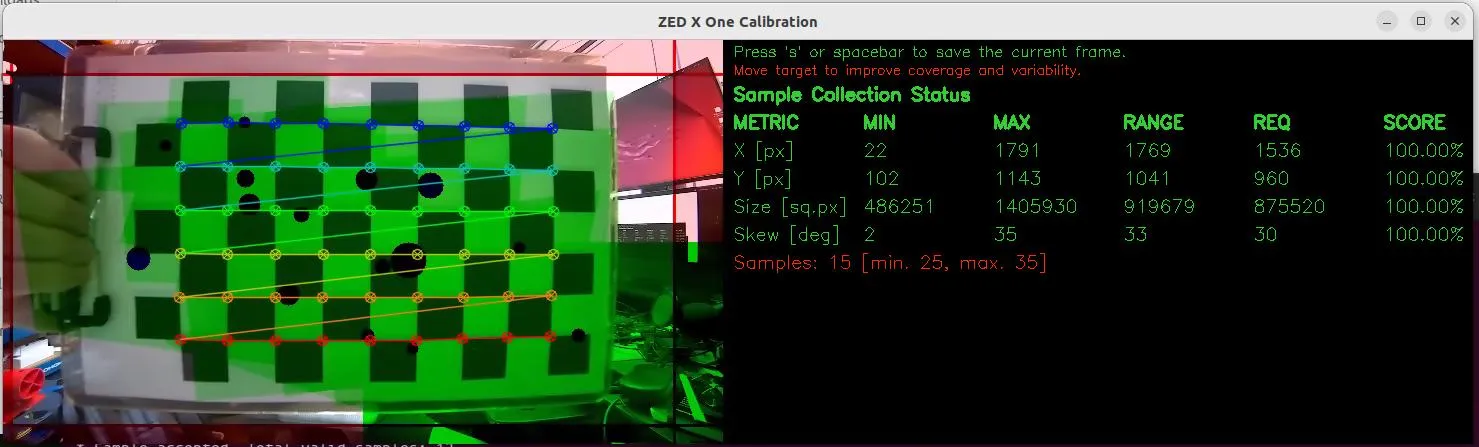
The tool accepts the following parameters:
For example, to calibrate a fisheye lens using a 12×9 checkerboard with 30 mm squares:
The calibration runs in two phases:
- Data acquisition: Move the checkerboard in front of the camera and press Spacebar or S to capture each frame. The tool enforces quality checks (sharpness, diversity) and provides real-time feedback on X/Y coverage, size range, and skew.
- Calibration computation: Computation triggers automatically once all metrics reach 100% with the minimum number of samples, or when the maximum sample count is reached.
When complete, the tool writes two files:
mono_calibration_SN<serial_number>.yml: OpenCV format containing the camera matrix (K) and distortion coefficients.SN<serial_number>_mono.conf: ZED-compatible format covering all supported resolutions.
To let the ZED SDK use your calibration automatically for the corresponding camera, copy the generated .conf file into the settings folder of your ZED SDK installation:
- Linux:
/usr/local/zed/settings/ - Windows:
C:\ProgramData\StereoLabs\settings\
The file must be renamed to follow the SNxxxxxxxx.conf convention, where xxxxxxxx is the camera serial number (for example, SN10025660.conf).
On Windows, a ZED X One camera cannot be connected and used directly, since the GMSL2 driver requires an NVIDIA® Jetson™ platform. You can still work with ZED X One data on Windows by playing back SVO2 recordings or by receiving a local network stream from a Jetson™ device. In these cases the .conf calibration file must be copied manually into the C:\ProgramData\StereoLabs\settings\ folder, following the SNxxxxxxxx.conf naming convention described above.
Validate the calibration with zed_mono_checker
After calibrating, use the zed_mono_checker tool to verify the result. It measures the reprojection error in real time against the detected checkerboard corners, giving you immediate feedback on calibration quality.
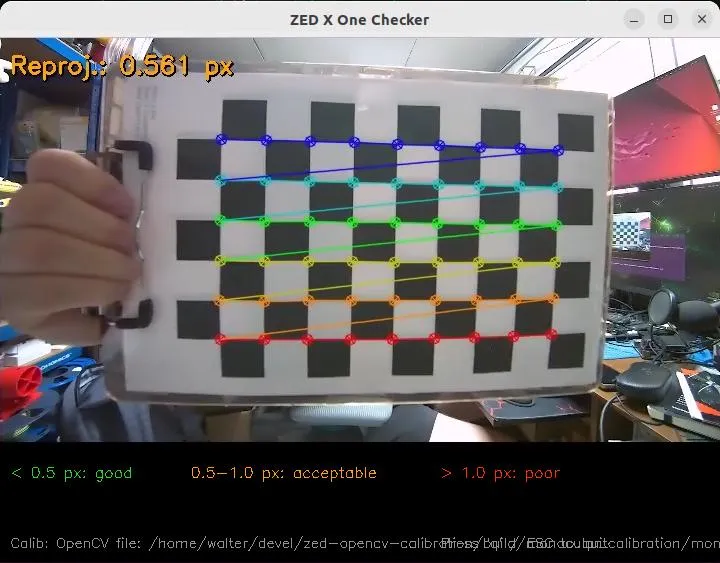
By default, the checker uses the camera’s internal calibration. To validate a specific calibration file, pass it with --calib_opencv:
The checker accepts the same camera, checkerboard, and lens parameters as the calibration tool, plus:
The reprojection error is displayed and color-coded:
- Green: below 0.5 px (good)
- Orange: 0.5–1.0 px (acceptable)
- Red: above 1.0 px (poor; recalibration recommended)
If the error is consistently in the red range, run zed_mono_calibration again, taking care to cover the full field of view with diverse checkerboard poses.