

How to Build Applications with Unity and ZED
This section describes how to build apps in Unity using the ZED.
Build Settings
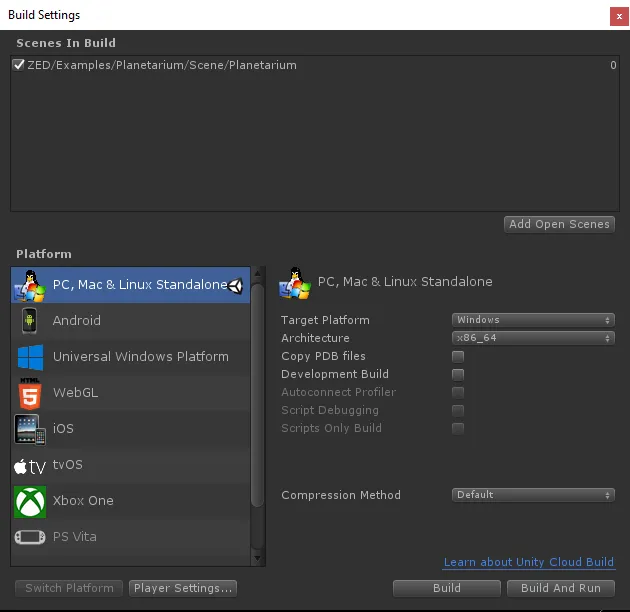
To build an application with the ZED SDK, you need to make sure the target platform is set to x86_64 in Unity build settings.
- Click on File > Build Settings
- Set Target Platform to Windows (or Linux) and Architecture to x86_64.
- If there are no scenes listed under “Scenes In Build”, click Add Open Scenes.
- Click Build And Run to generate the executable and automatically launch it.
VR Support
To enable VR support, go to Edit -> Project Settings -> XR Plug-in Management, click Install XR Plugin Management if it is not installed yet, and enable the provider of your headset. The ZED Unity plugin is compatible with OpenVR, Oculus and OpenXR.
Oculus Rift
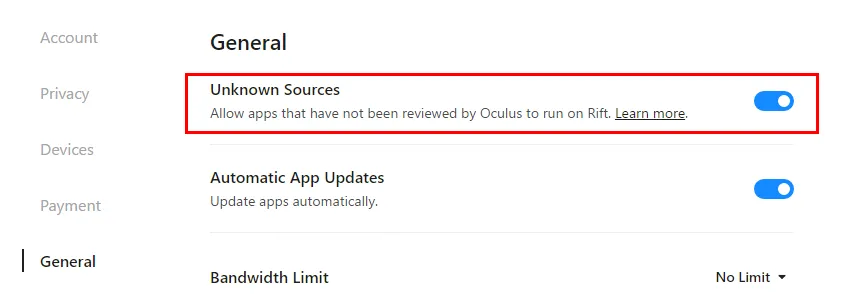
To run your application on Oculus Rift, you must also allow apps from unknown sources to run:
- Launch the Oculus App
- Go to Settings > General and allow Unknown Sources.
Windows Mixed Reality
The ZED Unity plugin supports WMR headsets via SteamVR only, which requires different settings than described in Unity’s WMR Quick Start Guide. If you have trouble building the app, check the following:
- Your platform must be set to PC, Mac & Linux Standalone (not Universal Windows Platform)
- You must enable the OpenVR provider in XR Plug-in Management
- You must have Windows Mixed Reality for SteamVR installed