ZED Nodelets
The ZED ROS Wrapper packages are no longer maintained because ROS 1 reached end-of-life (EOL) on 2025-05-31 with the final Noetic release.
We recommend upgrading to ROS 2 to take advantage of the latest ZED SDK features for robotics applications.
The zed_wrapper package contains the standalone ZED Wrapper node that can be started as is using the provided launch files, as described in the ZED Wrapper Node documentation.
But the ZED Wrapper has been designed to take maximum advantage of the nodelet package, in order to run multiple algorithms in the same process with zero copy transport between algorithms.
The core of the ZED Wrapper is indeed the ZEDWrapperNodelet nodelet, available in the zed_nodelets package that provides the interface between the ZED SDK and the ROS environment.
Starting a ZED nodelet
A nodelet manager is required to start the ZEDWrapperNodelet. It can be started manually from the command line:
Now the ZEDWrapperNodelet nodelet can be loaded inside the new zed_nodelet_manager nodelet manager:
The nodelet works exactly like a standalone ZED node. You can use the command rosnode list to verify that it is correctly running together with the zed_nodelet_manager:
It is also possible to start the ZEDWrapperNodelet nodelet as a standalone node, but by doing so you will lose all the advantages of a nodelet that will be shown next:
This is exactly what’s done internally by the ZED Node, using the nodelet C++ APIs.
ZED nodelet parameters
When started using one of the two methods illustrated above, the ZEDWrapperNodelet nodelet is configured using the default parameters. We provide a launch file that allows you to load custom parameters using the YAML files described in the ZED Wrapper Node documentation:
First start a nodelet manager:
then launch the nodelet:
ZED:
ZED Mini:
ZED 2:
ZED 2i:
ZED X:
ZED X Mini:
The power of nodelets
To really perceive the power of the nodelet package it is necessary to load more nodelets inside the same nodelet manager, that is inside the same process. In this way, the different nodelets can exploit the advantages of the intra process communication that allows zero-copy passing of data between nodelets.
Why is this important? The ZED nodelet publishes images and point clouds at high frequency. Subscribing to these kinds of topics using the standard node serialized communication requires a lot of memory copies that generate latency and requires more computational power. Instead, using zero-copy, no memory copy is required as the memory is simply shared between the nodelets that are contained in the same nodelet manager process. Furthermore, intra-process communication allows a reduction of the network traffic for nodes running on the same machine.
Examples
To demonstrate how to use the ZED nodelet to exploit the power of nodelets we provide two examples:
- topics synchronization and mux
- depth image to 2D laser scan
Topics synchronization
Sometimes it is useful to synchronize and mux a few topics in one single topic using their timestamp, for example, to save a rosbag or to guarantee that all the topics published in the same instant are received on the other side of a network.
To perform this operation we provide the nodelet zed_nodelets/RgbdSensorsSyncNodelet that allows the synchronization of RGB, Depth, IMU, and Magnetometer information in a single topic with the custom message type RGBDSensors.
Custom message: RGBDSensors
The custom message RGBDSensors is defined in the package zed_interfaces as:
This message allows publishing visual/depth information (RGBD) synchronized with inertial and orientation data.
Parameters
The nodelet can be configured using the following parameters, the file sync.yaml with the definition of all the parameters and their default values is provided in the zed_wrapper package:
Start the nodelet
You can start the RgbdSensorsSyncNodelet nodelet and the ZEDWrapperNodelet nodelet in the same nodelet manager easily using the zed_sync_nodelet.launch launch file provided in the zed_nodelet_example package:
ZED:
The ZED camera does not provide inertial and magnetometer information, so we must disable the subscription to these topics
ZED Mini:
The ZED Mini camera does not provide magnetometer information, so we must disable the subscription to this topic
ZED 2:
ZED 2i:
The launch file explained
A brief description of the main part of the zed_sync_nodelet.launch file.
Setting the name of the nodelet manager using the camera name as a prefix:
The nodelet manager, the RgbdSensorsSyncNodelet nodelet and the ZEDWrapperNodelet nodelet are included in the same namespace that takes the name from the camera name parameter:
Starting the nodelet manager:
Loading the ZEDWrapperNodelet nodelet:
Loading the RgbdSensorsSyncNodelet nodelet:
The RgbdSensorsSyncNodelet nodelet loads the parameters directly from the sync.yaml file as described above, but the zed_nodelet_name parameter value is overwritten to take automatically the name set for the ZEDWrapperNodelet nodelet that publishes the topics to be synchronized.
Demux the topics
An RGBDSensors message cannot be used by standard ROS nodes. You must create your own node that subscribes to it and extracts all the available data.
To make it easier to access the information stored in the RGBDSensors message, we provide a demux nodelet: RgbdSensorsDemuxNodelet.
You can start the demux nodelet as a standalone node using the following command:
or you can use it inside a nodelet manager to exploit zero-copy if you have other nodelets that can be combined together to process the provided data.
The RgbdSensorsDemuxNodelet subscribes to a topic called rgbd_sens. It is important to remap the name of this topic to correctly match the name of the available topic to demux, i.e. /zed/zed_nodelet_sync/rgbd_sens.
Depth image to 2D laser scan
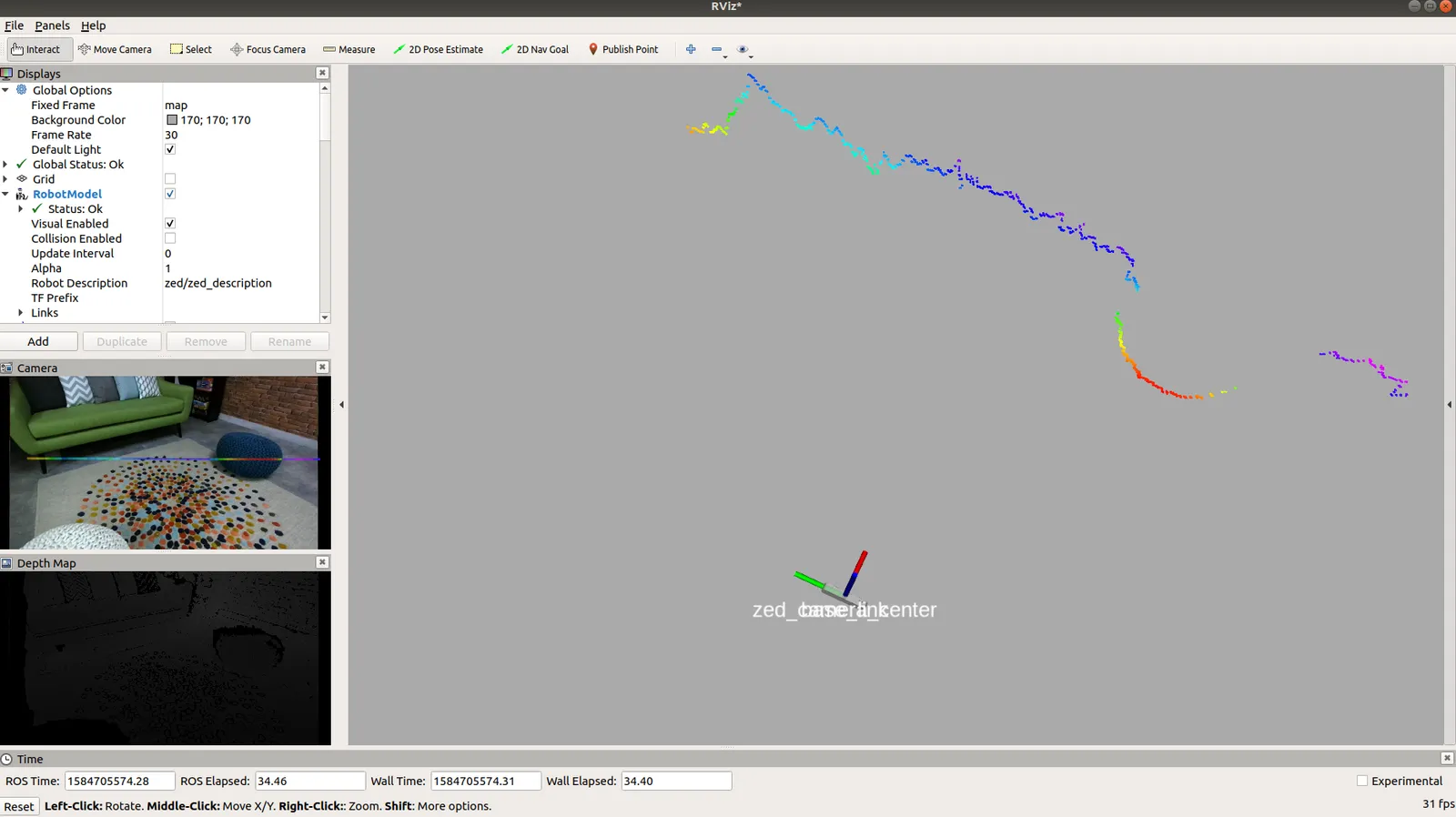
Most of the mapping packages included in ROS require 2D laser scan information to work (see gmapping, cartographer, amcl). The easiest way to generate a virtual 2D laser scan from 3D information is to use the depthimage_to_laserscan package and the provided DepthImageToLaserScanNodelet nodelet.
Start the nodelet
We provide the zed_laserscan_nodelet.launch launch file in the zed_nodelet_example package to easily start the ZEDWrapperNodelet and the DepthImageToLaserScanNodelet in the same nodelet manager:
ZED:
ZED Mini:
ZED 2:
ZED 2i:
The launch file explained
A brief description of the main part of the zed_laserscan_nodelet.launch file.
Setting the name of the nodelet manager using the camera name as a prefix:
The nodelet manager, the DepthImageToLaserScanNodelet nodelet and the ZEDWrapperNodelet nodelet are included in the same namespace that takes the name from the camera name parameter:
Starting the nodelet manager:
Loading the ZEDWrapperNodelet nodelet:
Loading the DepthImageToLaserScanNodelet nodelet:
The DepthImageToLaserScanNodelet requires the following parameters to be set to correctly work:
scan_height: The number of pixel rows to use to generate the laser scan. For each column, the scan will return the minimum value for those pixels centered vertically in the image.output_frame_id: The frame id of the laser scan. For point clouds coming from an “optical” frame with Z forward, this value should be set to the corresponding frame with X forward and Z up.range_min: The minimum range to return in meters. Ranges less than this will be output as -Inf.
Finally, we must remap the input topic image so DepthImageToLaserScanNodelet can subscribe to the correct sensor_msgs/Image topic providing depth information: depth/depth_registered, with the ZED nodelet name as a prefix.