

Sensors Time Synchronization
Accurate time synchronization is required for reliable integration of data from multiple sensor sources. The ZED SDK timestamps the images and the sensor data of a camera on the same host clock, with nanosecond resolution. These timestamps can be used to:
- Integrate multi-sensor data from a single camera such as IMU and stereo images.
- Fuse data with external sensor sources such as GPS or LiDAR.
This page explains how to align IMU samples with the images returned by grab(), which time reference to use for each need, and the mistakes that lead to misaligned data in a fusion pipeline.
Image and Sensor Timestamps
Since images and sensor samples share the same clock, their timestamps can be compared directly:
- The timestamp of the last grabbed frame is returned by
getTimestamp(TIME_REFERENCE::IMAGE). - The timestamp of an IMU sample is stored in
sensors_data.imu.timestamp. It is the time of the measurement, not the time your application read it.
By default, timestamps are in Epoch time. Since ZED SDK 5.3, Camera::setTimestampClock() can select a monotonic clock instead, which is not affected by NTP or PTP adjustments.
The TIME_REFERENCE enum selects which instant a function refers to:
Center of Exposure
The IMAGE timestamp is taken at the start of the sensor readout, which is the moment the exposure of the frame ends. A sensor that timestamps the instant it measures, such as an IMU, a LiDAR or a robot joint encoder, is therefore compared with an image whose light was collected earlier.
Since ZED SDK 5.5, getTimestamp(TIME_REFERENCE::IMAGE_CENTER_OF_EXPOSURE) returns the middle of the exposure window, which is half an exposure earlier than IMAGE. With an exposure time of 11.7 ms, for example, it is 5.9 ms earlier. Use it as the frame time when you fuse images with such sensors, especially when the exposure time is long compared to the motion you want to capture.
The center of exposure is only available on the ZED X, ZED X Mini, ZED X One GS and ZED X One 4K, live or from an SVO file recorded with one of these cameras and ZED SDK 5.1 or later. On other inputs (USB cameras, HDR models, files without per-frame exposure), getTimestamp() returns 0 and logs a warning: always check for 0 and fall back to IMAGE.
- On the rolling shutter ZED X One 4K, the value refers to the first row of the image. The following rows are exposed progressively later.
- For SVO files recorded with a ZED SDK older than 5.5, the value is computed with the exposure of a later frame. See the ZED SDK 5.5 release notes.
Getting Time Synced Sensors Data
The IMU and the image sensor run at different rates: the IMU of a ZED 2i, for example, runs at 400 Hz, while its images are captured at up to 100 FPS. Read the IMU rate of your camera from sensors_configuration.accelerometer_parameters.sampling_rate in the camera information instead of hard-coding it.
The ZED SDK offers three ways to read IMU data, described below.
TIME_REFERENCE::IMAGE and TIME_REFERENCE::CURRENT
The function getSensorsData(sensors_data, TIME_REFERENCE) fills a SensorsData structure with a single sample of each sensor, as explained in Using the Sensors API. The time reference selects which IMU sample is returned:
TIME_REFERENCE::IMAGEreturns the IMU sample closest to the timestamp of the last grabbed frame. It can be slightly before or slightly after the frame, usually by a few milliseconds.TIME_REFERENCE::CURRENTreturns the most recent IMU sample available.
The Camera-IMU synchronization schema below illustrates the values returned with these two settings.
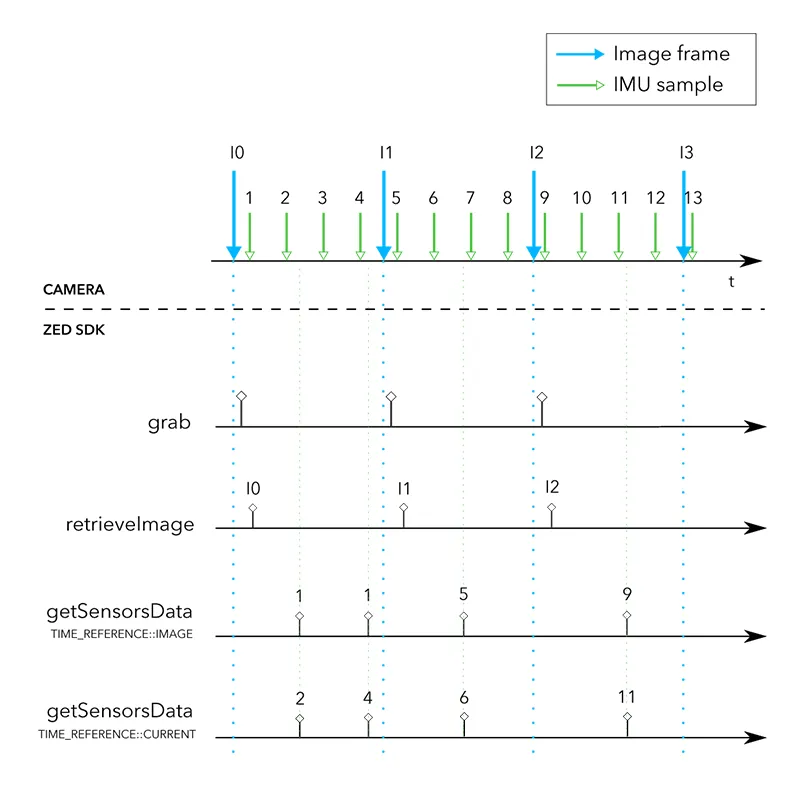
In the example above, we call grab() and retrieveImage() to retrieve the most recent image frame available from the camera. Then we call one of the two functions below:
-
getSensorsData(sensors_data, TIME_REFERENCE::IMAGE)returns IMU sample “1”, captured near image frame “I0”. Calling the function again before a new frame is available returns the same IMU sample “1”. -
getSensorsData(sensors_data, TIME_REFERENCE::CURRENT)returns the most recent IMU sample. Calling the function twice returns IMU samples “2” and “4”, independently of thegrab()calls and of the image timestamps.
getSensorsDataBatch()
Since ZED SDK 5.1, getSensorsDataBatch() returns, as a list of SensorsData sorted oldest first, every IMU sample not yet returned whose timestamp is not newer than the frame that grab() just returned. Call it once after each grab() to process the IMU at its full rate without running a separate polling thread:
- The list is filled once per
grab(). Calling the function again before the nextgrab()returns an empty list. - The first call also returns the samples received before the first frame.
- The samples received while your application does not call
grab(), for instance during a long processing step, are returned by the next call. With a live camera, the SDK keeps up to 2.5 seconds of samples with the ZED 2 and ZED 2i, and 0.5 seconds with the other cameras: older samples are lost. - On GMSL cameras (ZED X family), the IMU data reaches the host in bursts. A sample can arrive after the frame that follows it was grabbed: it is then returned with the next frame, with a timestamp a few milliseconds older than the previous frame. Assign the samples to frames with their timestamps, not with the call that returned them, as shown in the full-rate example.
- In C++,
getSensorsDataBatch()appends the samples to the vector you pass without clearing it. Callclear()before each call, or declare a new vector. - With an SVO file recorded in the legacy SVO 1 format, which does not contain the full-rate IMU data,
getSensorsDataBatch()andTIME_REFERENCE::CURRENTreturnERROR_CODE::INVALID_FUNCTION_PARAMETERS. The same applies to a network stream that does not carry the full-rate IMU data.
Which One to Use
Since getSensorsDataBatch() returns the samples once per frame, a sample can wait up to one frame period, plus the time needed to transfer and process the image, before your application reads it. This is why the lowest latency requires TIME_REFERENCE::CURRENT in a dedicated thread.
Common Mistakes
The following mistakes are the most frequent causes of misaligned IMU and image data.
Calling getSensorsData() with TIME_REFERENCE::CURRENT right after grab() to get the IMU sample of the frame. grab() returns after the image is transferred and processed, so the most recent IMU sample is not the one closest to the frame. In our tests, it was 26 to 64 ms newer than the image with a ZED 2i, and from 14 ms older to 64 ms newer with a ZED X Mini. During SVO playback, CURRENT does not follow the time of the frame either. Use TIME_REFERENCE::IMAGE or getSensorsDataBatch().
Polling TIME_REFERENCE::CURRENT at the IMU rate. Each call returns only the newest sample, and GMSL cameras deliver the IMU in bursts: a loop running at the IMU rate misses samples. Poll several times faster than the IMU rate and keep a sample only when its timestamp is newer than the last one, or use getSensorsDataBatch() if you do not need the lowest latency.
Reading TIME_REFERENCE::IMAGE data or the batch from a thread other than the one calling grab(). Both change at each grab(), so a call made while another frame is being grabbed can return the data of the next frame. The batch can also be read only once per frame: if two threads read it, one of them gets an empty list. Read them right after grab(), in the same thread.
Comparing ZED timestamps with another clock. The image and IMU timestamps use the clock selected with Camera::setTimestampClock(). To get the current time on the same clock, use sl::getCurrentTimeStamp() (sl.get_current_timestamp() in Python, zed.GetCurrentTimeStamp() in C#) instead of the clock of your language, such as std::chrono::system_clock or time.time(), which differs from the ZED timestamps when a monotonic clock is selected.
Example: One IMU Sample per Frame
For each grabbed frame, this example reads the IMU sample closest to the image with TIME_REFERENCE::IMAGE. It prints the offset between the two timestamps, the orientation of the camera and its acceleration.
Example: Every IMU Sample Between Two Frames
This example reads every IMU sample with getSensorsDataBatch() and assigns each one to the interval between two frames, as needed by a visual-inertial filter: the filter is propagated with the IMU samples up to the time of a frame, then updated with that frame.
Since an IMU sample can arrive with the next frame, the example processes each frame one grab() later, once all of its samples have been received. It uses the center of exposure as the frame time when it is available. If the latency of one frame is not acceptable, process the frame right away and handle the late samples in your filter.
Using the API
To learn how to read the data of each sensor, read the Using the Sensors API section.