

Using Positional Tracking with ROS 2
Configuring the positional tracking
All the positional tracking parameters live in the pos_tracking namespace of common_stereo.yaml. See the Positional tracking parameters reference for the full list. Two of them drive the algorithm itself:
pos_tracking.pos_tracking_mode:AUTOuses the ZED SDK default. UseGEN_1for the legacy behavior andGEN_3for the latest algorithms.pos_tracking.compute_preference[ZED SDK >= 5.5]: how much GPU the positional tracking may use.PREFER_GPUmakes the tracking faster and shortensgrab(),PREFER_CPUkeeps the GPU free for your own workloads.GEN_3runs on the CPU by default, whileGEN_1computes depth and therefore uses the GPU regardless of the setting.
Pose confidence
With ZED SDK >= 5.4 and POSITIONAL_TRACKING_MODE::GEN_3, the node reports a [0,100] quality metric for the pose, where 0 means that tracking is lost. It is published as the pose_confidence field of the PosTrackStatus message on ~/pose/status, and shown as Pose confidence in the node diagnostic. It requires zed_msgs v5.5. Until the first pose is retrieved, the field stays at 0 and the diagnostic shows N/A.
When positional tracking is disabled (pos_tracking.pos_tracking_enabled: false) the node does not advertise the odom and pose topics, does not publish TF, and does not advertise the positional tracking services. The GNSS fusion and the Plane Detection are automatically disabled as well.
The pose is referred to the base frame <camera_name>_camera_link, which requires the camera static transforms of the ZED URDF. If they are not published, the node starts the positional tracking after 10 seconds and refers the pose to <camera_name>_camera_center: see Static transforms and positional tracking.
Area memory files
With pos_tracking.area_memory: true, the node can save the map of the explored area to a file, either when it closes (pos_tracking.save_area_memory_on_closing: true, to the file set in pos_tracking.area_file_path) or at any time with the ~/save_area_memory service. At the next start, the node loads the file set in pos_tracking.area_file_path to relocalize in the same environment.
With ZED SDK >= 5.6 and POSITIONAL_TRACKING_MODE::GEN_3, area files are saved in a new format that ZED SDK 5.5 and older versions cannot load. Area files saved with an older version still load, but the node saves them back in the new format, for example when it closes with save_area_memory_on_closing: true, which overwrites the original file. Keep a copy of the original file if a robot running an older ZED SDK still needs it.
Motion prior
With ZED SDK >= 5.6 and POSITIONAL_TRACKING_MODE::GEN_3, the positional tracking can use the motion measured by your own source, such as the wheel odometry of a robot or an external visual-inertial system, to stay accurate in fast motion, in low texture or when the camera is occluded. While the images cannot be used, the pose follows the motion source. It is available since v5.6.0 of the ROS 2 Wrapper, with a live camera: the node disables it with an SVO file or a simulated camera.
Enable it with pos_tracking.motion_prior.enabled: true and set pos_tracking.motion_prior.topic to a nav_msgs/Odometry topic. For each message, the node sends the motion since the previous one, using:
- Where the source is mounted: read from TF, from the left camera frame to the
child_frame_idof the messages, so that frame must be published (for example by your robot description). For a source mounted on the IMU of the camera, launch the node withpublish_imu_tf:=true. - Measured axes: set
pos_tracking.motion_prior.measured_axesto the axes your source really measures. Wheel odometry measures forward, sideways and heading motion (['TX','TY','RZ']), a gyroscope only rotations (['RX','RY','RZ']). Declaring an axis the source does not measure degrades the tracking instead of improving it. - Uncertainty: taken from the
twist.covarianceof the messages over the interval since the previous message. When it is not set, the node usestranslation_std_per_mandrotation_std_per_rad, with a minimum of 1 mm and 1 mrad per message. - Timestamps: the messages must be stamped with the same synchronized clock as the camera. A sample that arrives more than 2 seconds after the images is discarded, with a warning.
The Motion prior status entry of the node diagnostic, shown while the motion prior is enabled, tells how the motion was used for the last image: OK, DEFERRED (normal when the samples arrive after the image), MISSING, OUT_OF_SYNC or REJECTED (it disagreed with the images). While the pose follows the motion source, Tracking Fusion status reports MOTION PRIOR.
To see where the motion prior holds the map, display the ~/pose/motion_prior_links topic (visualization_msgs/Marker) in RViz 2. It is published about once per second while the motion prior is enabled and a node subscribes to it: each segment joins the two keyframes that the motion prior holds apart, green when the motion was applied as the images came in, yellow when it was applied once the source covered the interval (deferred), and red when the refined map disagrees with it (rejected).
When the motion disagrees with the images too often, or when the source keeps claiming no motion while the camera moves (a stopped encoder), the ZED SDK stops using the motion prior for the rest of the tracking session and logs a warning. The usual causes are a wrong mounting transform in TF, a wrong sign convention, an axis declared but not measured, or an uncertainty that is too small.
Position with RViz 2
In this tutorial, you will learn in detail how to configure your own RViz 2 session to see only the position data information that you require.
RViz 2 provides plugins for visualizing the camera’s pose and its path over time.
Camera pose
The Pose plugin provides a visualization of the position and orientation of the camera (geometry_msgs/PoseStamped) in the Map frame.
The Topic to be subscribed to is ~/pose.
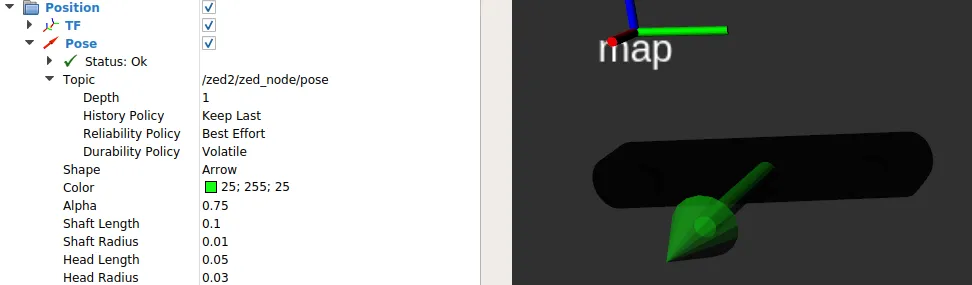
Key parameters:
Topic: Selects the pose topic/zed/zed_node/poseReliability Policy: Set the QoS reliability policy.Best Effortis suggested for performance,Reliableis used for compatibilityPosition toleranceandAngle tolerance: set both to0to be sure to visualize all positional dataKeep: Set to the number of messages to visualize at a timeShape: You can visualize pose information as an arrow pointing in the direction of theXaxis, or as a threeAxesframe. Both shapes can be resized to your preference
Camera path
The ZED wrapper provides two different paths for the camera position and orientation:
~/path_map: The history of the camera pose in Map frame~/path_odom: The history of the odometry of the camera in Map frame
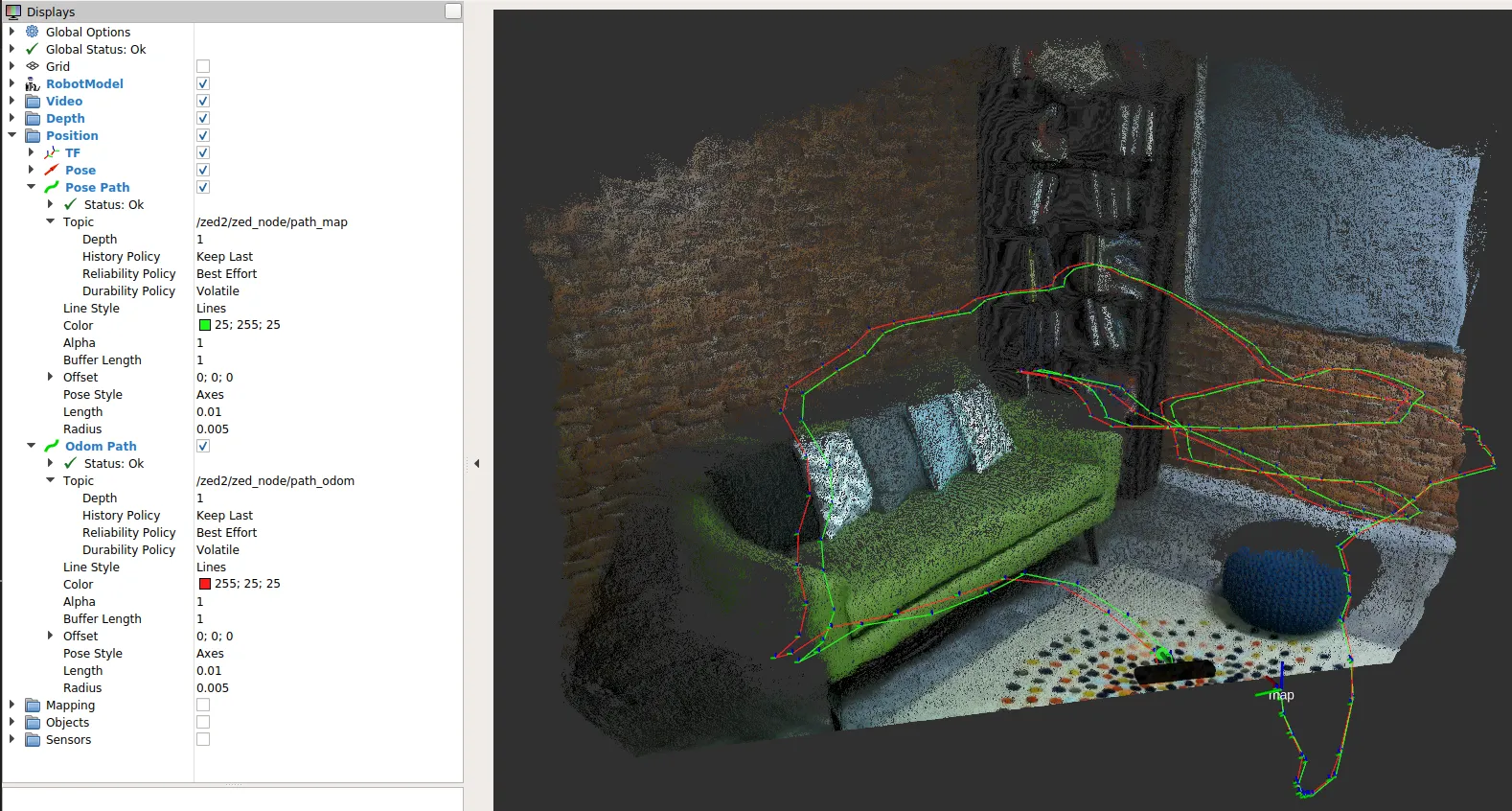
Above you can see both the Pose (green) and the Odometry (red) paths.
The odometry pose is calculated with a visual-inertial odometry algorithm (pure visual odometry on cameras without an IMU) as the sum of the movement from one step to the next. It is therefore affected by drift.
The camera pose is instead continuously corrected using the StereoLabs tracking algorithm that combines visual information, space memory information, and, on cameras equipped with an IMU (e.g. ZED Mini, ZED 2, ZED 2i, ZED X, ZED X Mini), inertial information.
The parameters to be configured are analogous to the parameters seen above for the Pose plugin.
Position info subscribing in C++
In this tutorial, you will learn how to write a simple C++ node that subscribes to messages of type geometry_msgs/PoseStamped and nav_msgs/Odometry to retrieve the position and the orientation of the ZED camera in the Map and in the Odometry frames.
Introduction
Open a new console and use this command to connect the camera to the ROS 2 network:
The old launch command ros2 launch zed_display_rviz2 display_<camera model>.launch.py is obsolete. Use the display_zed_cam.launch.py command above.
The ZED node will start to publish pose data in the network only if there is another node that subscribes to the relative topic.
Running the tutorial
If you properly followed the ROS 2 Examples Installation Guide, the executable of this tutorial has been compiled and you can run the subscriber node using this command:
The tutorial node subscribes to generic pose and odom topics, so a remapping is required to connect to the correct topics published by the ZED node:
If the ZED node is running and a camera is connected or you have loaded an SVO file, you will receive the following stream of messages confirming that you are correctly subscribing to the ZED positional tracking topics:
The code
The source code of the subscriber node zed_tutorial_pos_tracking.cpp:
The code explained
The tutorial is written using the new concept of Component introduced in ROS 2 in order to take advantage of the node composition capabilities.
A component named MinimalPoseOdomSubscriber is created subclassing the ROS 2 object rclcpp::Node.
In the constructor, we initialize the parent class Node with the name of our node, zed_odom_pose_tutorial:
The constructor mainly defines mPoseSub and mOdomSub, two std::shared_ptr to objects that create two subscribers in the node. The subscribers listen to the pose and odom topics and call the callback functions MinimalPoseOdomSubscriber::poseCallback and MinimalPoseOdomSubscriber::odomCallback every time they receive a message.
ROS 2 uses the new constructs available with C++11 and C++14, so to bind the callbacks (a class method in this case) to the mPoseSub and mOdomSub objects we use the form
std::bind(&MinimalPoseOdomSubscriber::<callback_name>, this, _1).
It is important that the two subscriptions use a QoS profile compatible with the QoS profile of the publisher of the topics.
In this case, the QoS profile is configured to keep the last received 10 messages with “best effort” reliability and “volatile” durability. This configuration is highly compatible with many possible publisher configurations.
For more information about QoS compatibility, refer to the ZED node guide.
Now we must define the callbacks to execute when one of the subscribed topics is received:
The two callbacks are very similar; the only difference is that poseCallback receives messages of type geometry_msgs/PoseStamped and odomCallback receives messages of type nav_msgs/Odometry. These are similar but not identical. However, the information extracted by the two topics is the same: camera position and camera orientation.
Extracting the position is straightforward since the data is stored in the x, y, and z fields of a geometry_msgs/Point.
Extracting the orientation is less straightforward as it is published as a quaternion vector. To convert the quaternion to a more readable form, we must first convert it to a 3x3 rotation matrix from which we can finally extract the three values for Roll, Pitch and Yaw in radians.
We can then print the received information and the timestamp of the message to the screen, after converting the radian values to degrees.
Finally, the main function is standard for a ROS 2 node that executes a single component:
The ROS 2 environment is initialized using the rclcpp::init command. Then we create a pos_track_node Component as a std::shared_ptr
to the MinimalPoseOdomSubscriber class that we defined above.
Then the code of the node is executed in the main thread using the rclcpp::spin(pos_track_node); command. The node will run until the user presses Ctrl+C to stop it, shut it down, and exit.
Conclusions
The full source code of this tutorial is available on GitHub in the zed_pose_tutorial sub-package.
Along with the node source code, you can find the package.xml and CMakeLists.txt files that complete the tutorial package.