

Running and Building ARM Docker Containers on x86
This section explains how to build an application on an x86_64 platform and run it on an NVIDIA® Jetson™, which uses the ARM architecture.
The main benefits of building for NVIDIA® Jetson™ from an x86 host are:
- Faster development. Building an application directly on a board such as the NVIDIA® Jetson™ Orin™ Nano can be very slow. ARM emulation lets you build on a fast x86 host and run the result on the Jetson™.
- More resources. Compilation is resource-intensive. Boards such as the NVIDIA® Jetson™ Orin™ Nano are limited in memory and disk space, so they may not have the resources to build large, complex packages with AI features.
Setting Up ARM Emulation on x86
We will use QEMU and Docker to set up our emulated environment. QEMU is an open-source machine emulator and virtualizer. It lets you build ARM CUDA binaries on an x86 machine without a cross-compiler.
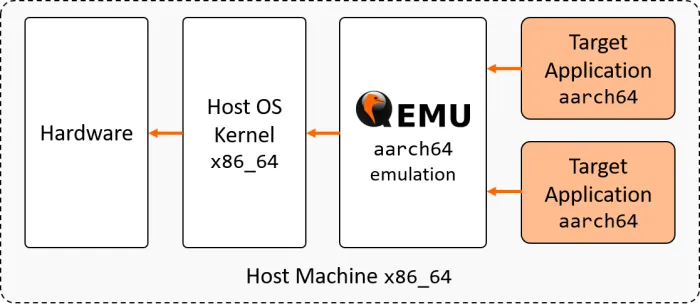
First, let’s see what happens (before setting up the emulation) when we try to run a program compiled for a different architecture:
As expected, the instructions are not recognized, because the emulation support is not installed yet. Installing the following packages enables support for aarch64 containers on your x86 workstation:
The installation was successful and the emulation is working. At this point, you can run aarch64 programs on the x86_64 host. However, it is not yet possible to build and run CUDA-accelerated applications under QEMU. To add this capability, you need to use a Linux for Tegra (L4T) base image from the NVIDIA® registry (see the next section for details).
For advanced details on using QEMU with Docker, refer to the multiarch/qemu-user-static repository on GitHub.
Building an NVIDIA® Jetson™ Container on your x86 Workstation
Now that QEMU is installed, you can build an application with CUDA and the ZED SDK by specifying the correct parent image for your container.
For example, to build a Docker image for NVIDIA® Jetson™ with CUDA, you can use the NVIDIA® l4t-jetpack image, which includes CUDA, cuDNN, and TensorRT (the lighter l4t-base image no longer includes CUDA since JetPack 5):
FROM nvcr.io/nvidia/l4t-jetpack:r<L4T_version>
To build a Docker image for NVIDIA® Jetson™ with CUDA and the ZED SDK, use a ZED SDK Jetson image as the parent:
FROM stereolabs/zed:<ZED_SDK_version>-devel-l4t-r<L4T_version>
Browse the StereoLabs DockerHub tags to pick the ZED SDK and L4T version that match your target board. For a detailed walk-through, see Creating a Docker Image for your ZED Application.
Deploying your Image to NVIDIA® Jetson
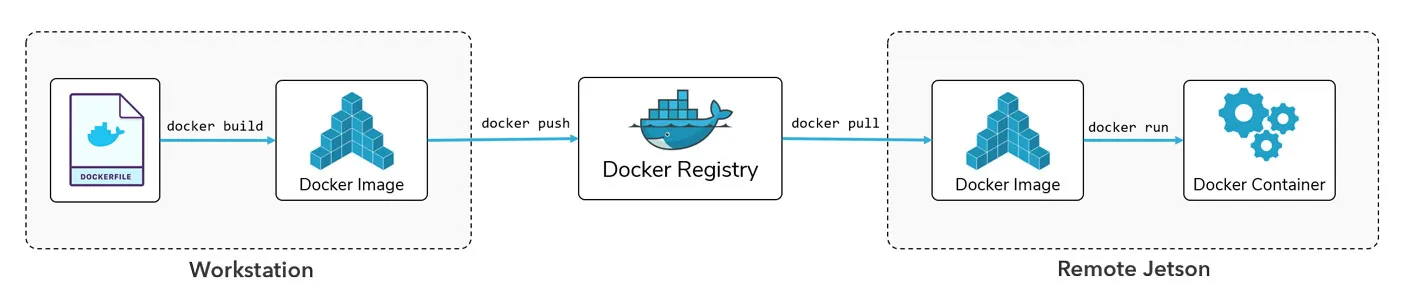
We recommend the workflow above for building and deploying your applications with Docker on NVIDIA® Jetson™. Your source code and Dockerfiles live on your local device (the host machine). The image is built from the Dockerfile on the host and pushed to a Docker registry that makes it accessible from a remote device (the target machine). On the target machine, the image is pulled from the registry and run in a container.
Build a Docker Image on the Host
To build a Docker image on the host machine, you need to:
- Write a Dockerfile for your application (see the Creating a Docker Image for your ZED Application section).
- Run the
docker buildcommand.
Run a Docker Image on the Target
Pull your image from the registry on the target machine, then run it in a container:
If the image has not been pulled previously, docker run will pull it from the registry automatically.