

Plane Detection Overview
Introduction
With the 3D information of the environment, the ZED camera can estimate the position of the planes present in the scene.
To detect a plane, positional tracking needs to be enabled with zed.enablePositionalTracking(). Also, a plane can be detected only if the tracking state of the camera is OK.
Therefore, the procedure for detecting a plane is as follows:
- Enable the positional tracking module
- Grab an image from the ZED
- Check that the tracking state is
OK - Estimate a plane position.
Detecting Planes
To estimate a plane position, you will need to use the findPlaneAtHit function and pass the 2D coordinates of a target pixel where you want to find its support plane. Below is an example of code that can be used to estimate the plane passing through the 3D point of pixel coord = (u,v):
If it succeeds the function stores the detected plane in a sl::Plane object, which includes useful information such as 3D position, normal, polygon boundaries and plane type (vertical/horizontal).
Accessing Plane Data
The sl::Plane class contains all the information for defining the plane in space such as normal, center and equation. To access this information use the getter of the class. For example:
For AR purposes it can be useful to get the Transform of the detected plane according to the global reference frame. For example to place an object close to a wall or to transform the global reference frame center to the plane center. This transform is accessible as follows:
Convert Plane to Mesh
The detected plane can be converted to a Mesh. Converting it to a mesh can be useful when highlighting a plane in the scene. To get the mesh of the plane, call:
Detecting Floor Plane
With the 3D information of the environment, ZED cameras can estimate where the ground floor is in a scene.
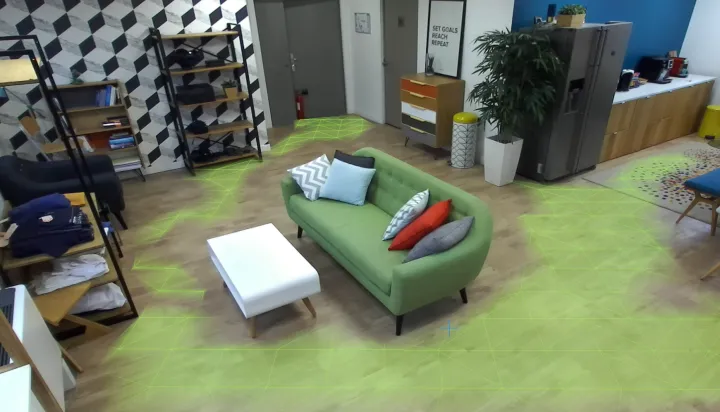
Getting Floor Plane
The floor plane can be automatically detected by calling findFloorPlane instead of findPlaneAtHit. Apart from storing the plane in a sl::Plane, this function will also store the transform between the floor plane frame and the camera frame.
This transform can be used to reset the tracking and align it with the floor plane frame as follows:
This code can be simplified by using PositionalTrackingParameters::set_floor_as_origin to align the positional tracking reference frame on the ground floor.
The estimation of the floor plane can be refined by passing prior parameters (such as prior height or orientation) to
the findFloorPlane function. For additional details on these parameters, please check out the
API Reference.