

How to Use OpenCV with ZED in C++
Introduction
In this tutorial, you will learn how to capture and display color and depth images using OpenCV and the ZED SDK in C++.
Code Example
The sample code is available on GitHub.
Sharing image data between ZED SDK and OpenCV
The ZED SDK provides its own sl::Mat class to store image data, with a structure and data types similar to OpenCV’s cv::Mat. Image data can be shared between sl::Mat and cv::Mat by having both memory pointers pointing to the same address. Therefore, no data transfer is required between the two matrices.
To convert an sl::Mat to a cv::Mat, we provide an slMat2cvMat() function in the OpenCV sample.
Capturing Video
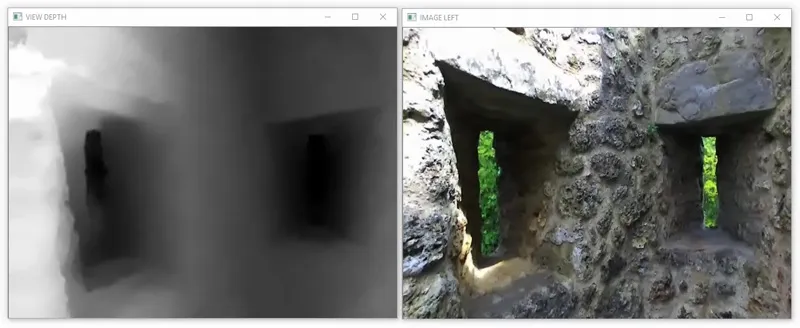
To capture video, use grab() and retrieveImage(). Since sl::Mat and cv::Mat share the same data, calling retrieveImage() will update the OpenCV matrix as well. Display the video with OpenCV using cv::imshow().
Capturing Depth
A depth map is a 1-channel matrix with 32-bit float values for each pixel. Each value expresses the distance of a pixel in the scene. The depth map can be retrieved using retrieveMeasure() and shared with a cv::Mat. Please refer to the Depth API for more information.
Displaying Depth
A cv::Mat with 32-bit float values can’t be displayed with cv::imshow.
If you want to display the depth map you have to normalize it to fit in an unsigned char matrix.
A call to sl::Camera::retrieveImage with VIEW::DEPTH returns such an image of the depth data as a grayscale image.
Do not use this representation for other purposes than displaying the image.
UVC Capture
You can also use a USB ZED camera as a standard UVC camera in OpenCV to capture raw stereo video using the code snippet below (GMSL2 cameras such as the ZED X are not UVC devices). To get rectified images and calibration with OpenCV, use the native capture sample available on GitHub.