

Using GNSS with ZED Box Orin
The GNSS module is an optional component of the ZED Box Orin NX, which can greatly enhance the precision of positioning data when used with Real-Time Kinematic (RTK) technology. With RTK, the GNSS module can achieve centimeter-level accuracy, significantly improving upon the typical few-meter accuracy of standard GNSS modules. This makes the GNSS module ideal for a variety of applications that require highly precise positioning information, such as autonomous vehicles, surveying, and precision agriculture.
Installation
Antenna
Your GNSS needs a male antenna to get a signal. It must be plugged into port 5 on the side of the ZED Box.
You can use the antenna we sell in our store, or any other GNSS antenna. However, the Wi-Fi antenna that also comes with the ZED Box will not work.
gpsd
gpsd is the simplest way to retrieve the GNSS data on your ZED Box.
Please follow this guide to install the correct version of gpsd on your device.
You can test that gpsd is working properly with the tool installed with gpsd:
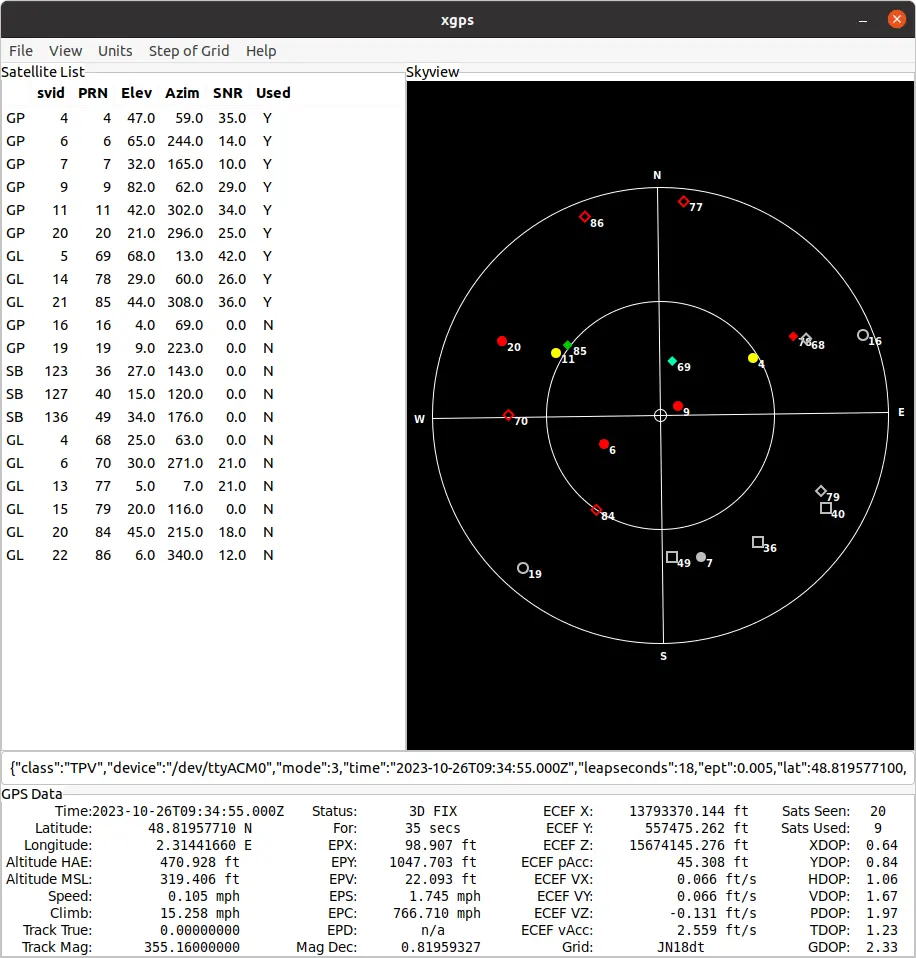
To verify that the GNSS module is properly detected, you can also use the following command:
You should see a file named /dev/ttyACM0 or /dev/ttyUSB0 containing the GNSS raw data. The streamed data should look as such:
Enabling RTK on your GNSS module
Using NTRIP
gpsd can act as an NTRIP client in order to retrieve RTK corrections from an RTK base station.
We will go through how to set up the NTRIP connection in order to get RTK centimeter-level accuracy.
For this you will need:
- url: the NTRIP URL address of the base station
- port: the NTRIP port of the base station
- mountpoint: the mountpoint you choose to use (Note: for good performance, the base station is recommended to be less than 25km away from the rover)
- username: the username used for the NTRIP connection (optional)
- password: the password used for the NTRIP connection (optional)
You can now run gpsd as an NTRIP client with:
You can now run xgps and wait for the GNSS to get an RTK fix. (The ECEF pAcc gives the 3D position accuracy; with an RTK FIX status this value should be of about a few centimeters)
Set RTK configuration at boot
gpsd runs as a cronjob set to run at the ZED Box’s startup. Update the cron job with the following command, so that gpsd will connect to the base station at every boot:
And replace the gpsd line already present with the following:
PPS signal
Besides the position data, the GNSS module provides a PPS (Pulse Per Second) signal: a hardware pulse emitted at the beginning of every UTC second. On the ZED Box Orin, this signal is wired directly to the PA.06 GPIO of the NVIDIA® Jetson™ module and is handled by the standard Linux pps-gpio driver, so the operating system can use it as a high precision time reference.
The time contained in the NMEA sentences is affected by the latency and the jitter of the serial link, which limits its accuracy to a few milliseconds. The PPS edge, instead, is aligned to UTC with an accuracy in the order of tens of nanoseconds, making it the recommended reference whenever your application requires accurate timestamps, for example to align camera frames with GNSS positions.
The PPS signal is generated only when the GNSS receiver has acquired a valid fix. If no antenna is connected, or if the sky visibility is poor, no pulse is produced.
Checking the PPS device
PPS support is enabled by default on the ZED Box Orin: no device tree modification and no additional driver are required. The kernel exposes the signal as a PPS character device:
You should get /dev/pps0.
A quick check that does not require any additional package is to read the timestamp of the last pulse:
The value is the system time of the last rising edge, followed by the number of pulses received since boot. Reading it twice one second apart should show the counter increasing.
To monitor the pulses continuously, install the pps-tools package:
Then monitor the device:
The output should look as such:
The assert value is the system time at which the kernel detected the rising edge of the pulse, and sequence increments once per second. A fractional part close to zero means that the system clock is already well aligned to UTC.
Device tree configuration
The PPS input is declared in the device tree shipped with the ZED Box Orin:
compatible = "pps-gpio"binds the pin to the Linuxpps-gpioclient driver, which is what creates the/dev/pps0device.TEGRA234_MAIN_GPIO(A, 6)is pin 6 of port A of the Jetson main GPIO controller, that isPA.06.GPIO_ACTIVE_HIGH, with noassert-falling-edgeproperty, means that the assert event reported by the driver is the rising edge of the pulse.
If you build a custom kernel or a custom device tree, for example when flashing a Real-Time Kernel, make sure that this node is preserved, otherwise /dev/pps0 will not be created.
Synchronizing the system clock with PPS
gpsd can read the PPS device together with the serial port of the GNSS module. Add /dev/pps0 to the list of devices passed to gpsd:
If you are also using RTK corrections through NTRIP, the PPS device is simply appended to the command described above:
You can check that gpsd is actually receiving the pulses with:
Samples labelled NTP0 come from the NMEA time, while the ones labelled NTP1 come from the PPS signal.
gpsd publishes these two time sources in shared memory, where an NTP daemon such as Chrony can read them to discipline the system clock. Install it with:
And add the two reference clocks to /etc/chrony/chrony.conf:
Restart the service and verify that the reference clocks are used:
The PPS source should be marked as the selected one (*) after a few tens of seconds.
Shared memory segments 0 and 1 are readable by the root user only. If chronyd does not run as root on your system, configure gpsd and Chrony to use segments 2 and 3 instead, which are created world readable.
To make the configuration persistent, update the gpsd line of the cron job described in Set RTK configuration at boot so that it also includes /dev/pps0.
Using PPS for camera and sensor synchronization
The PPS signal is not routed to an external connector of the ZED Box Orin, so it cannot be used to trigger external hardware directly. Synchronization is instead achieved through the system clock: once the clock is disciplined by PPS, every timestamp generated on the device shares the same UTC aligned time base with a sub-microsecond accuracy.
This matters because the ZED SDK Fusion module matches camera data and GNSS data by timestamp. A drifting clock produces timestamps that do not match the moment the data was actually acquired, which degrades the fusion result or causes the data to be dropped. See Data Synchronization for more details on how the matching is performed.
Disciplining the system clock with PPS is therefore recommended when:
- you fuse camera and GNSS data with the Global Localization module,
- you record datasets that must be replayed or compared with data coming from other machines,
- you run a multi-camera setup where several ZED Boxes must share a common time base.
Using GNSS in your applications
Python
To access GNSS data in Python, you can use the gpsdclient library. This library provides a Python interface to the gpsd daemon, allowing you to easily retrieve GNSS data in your Python scripts. With gpsdclient, you can access a range of GNSS data, including latitude, longitude, altitude, speed, and more. This makes it a powerful tool for building GNSS-enabled applications in Python.
You can install gpsdclient with:
Here is an example of a simple script using gpsdclient:
You can find a full code example of how to use the library in our Geotracking samples on GitHub.
C++
To access GNSS data in C++, you can use the libgpsmm library.
You can install libgpsmm with:
Here is an example of a simple script using libgpsmm:
You can find a full code example of how to use the library in our Geotracking samples on GitHub.
Install gpsd from scratch
If for some reason gpsd is not installed on your ZED Box, you can follow the following guide to install and use gpsd: