

ZED USB 3 Specifications
This page gathers the hardware specifications of the ZED 2i and ZED Mini USB 3 stereo cameras. The reference documents are the official ZED 2i and ZED Mini datasheets.
Image sensors
Both cameras are built around a pair of 1/3” 4 MP backside-illuminated rolling shutter sensors with large 2 µm pixels for good low-light sensitivity.
Depth sensing
Depth is computed by the ZED SDK Depth Sensing module using the Neural Depth Engine.
Optics
ZED 2i lens options
The ZED 2i uses a wide-angle 8-element all-glass dual lens with optically corrected distortion. Both lens options are also available with a built-in polarizing filter.
ZED Mini optics
Polarizing filter option
Both ZED 2i lens options can be ordered with a built-in circular polarizing (CPL) filter in front of the lenses. The filter cannot be added or removed later: it is part of the camera configuration and has its own part number. The ZED Mini is not available with a polarizer. This section explains what the filter does and helps you decide whether your application needs it.
The same outdoor scene with and without a polarizing filter. The polarized side of the sliding split shows a deeper blue sky, less glare on the asphalt and more saturated colors.
How it works
When sunlight reflects off non-metallic surfaces such as water, glass, wet asphalt, painted car bodies, plastic or glossy leaves, the reflected light becomes partially polarized. The polarizing filter blocks a large part of this polarized light while letting through the light that carries the actual texture of the scene. Light scattered by the blue sky is also partially polarized, so the filter darkens the sky and reduces atmospheric haze.
This matters for stereo vision because specular reflections and glare depend on the point of view: the same highlight appears at a different position in the left and right images, or in only one of them. Stereo matching then struggles to find consistent correspondences, resulting in holes, noise or wrong depth values on reflective surfaces. By removing most of these reflections, the filter makes the left and right images more consistent and the depth more reliable.
Advantages outdoors in sunlight
- Fewer reflections and less glare on water, windows, glass facades, wet roads, vehicles and other glossy surfaces, and therefore fewer depth artifacts and false detections in these areas.
- Better contrast and color saturation, with a less washed-out sky and less haze. The auto exposure can more easily preserve detail in both the sky and the ground.
- No practical cost from the light loss: in direct sunlight, the scene is bright enough for the camera to keep short exposure times and low gain even with the filter.
Disadvantages indoors and in low light
A polarizing filter also absorbs unpolarized light: it typically blocks half to two thirds of the incoming light, which corresponds to 1 to 1.5 stops. Indoors, where light levels are often hundreds of times lower than in daylight, this loss has visible consequences:
- Longer exposure times are needed to reach the same image brightness, which increases motion blur when the camera or objects move. The exposure time is also capped by the frame rate (about 33 ms at 30 FPS, 17 ms at 60 FPS and 10 ms at 100 FPS), so in dim scenes the camera quickly reaches this cap.
- Higher gain and more image noise: once the exposure time is at its maximum, the auto exposure compensates by raising the gain. Noise and blur degrade the depth (more noise, lower confidence, fewer valid pixels) and reduce the number of reliable visual features available to positional tracking, object detection and body tracking.
- Little benefit in return: artificial light is mostly unpolarized and indoor reflections are much weaker than sunlight glare, so the filter has little to remove.
- Screens can appear dark: most LCD and OLED displays emit polarized light. Depending on how the screen is oriented relative to the camera, monitors, phones or control panels can look dim or completely black through the filter.
Other points to consider
- The filter orientation is fixed. Unlike a photographic polarizer, it cannot be rotated to tune the effect, so its efficiency depends on the scene geometry. The effect is strongest on reflections seen at a grazing angle (around 30° to 40° above the reflecting surface) and on the part of the sky at about 90° from the sun. If you mount the camera rolled (for example vertically), the filter rotates with it and reduces reflections differently.
- Reflections from bare metal are not removed, because they are not polarized.
- Uneven sky with wide lenses: sky polarization varies with the direction relative to the sun, so with a wide field of view the sky can look unevenly darkened across the image. This effect is cosmetic and does not affect depth.
- Stress patterns: when the camera looks through tempered glass, a windshield or transparent plastic (for example a protective window in front of the camera), the filter can reveal rainbow or mottled patterns caused by internal stress in the material.
Should you choose the polarizer?
As a rule of thumb, choose the polarizer when the camera works mainly outdoors in daylight and reflections are a concern. For indoor, low-light or mixed setups, collecting as much light as possible usually matters more, so choose the version without a polarizer.
If you are unsure, record SVO files of your real scenes. Check the depth map on reflective surfaces, then check the exposure and gain values reported by the camera controls in your darkest conditions. A high gain, or an exposure time close to the frame period, means the scene is too dark for a polarizer.
How to check if your camera has a polarizer
- Check the label: on cameras with a polarizer, the label on the camera reports a “P” next to the serial number.
- If the label is damaged or unreadable, use an LCD display, which emits polarized light:
- Open ZED Explorer and point the camera toward the display, keeping part of the surroundings in the image.
- Rotate the camera by 90° around its optical axis, keeping the display in the image.
- If the display becomes darker in ZED Explorer, the camera has a polarizer. Without a polarizer, the display brightness does not change.
Infrared cut filter
Every ZED camera includes an infrared (IR) cut filter in its optics: a thin glass plate with an optical coating that transmits visible light and blocks the near-infrared (NIR) and ultraviolet (UV) light that the human eye cannot see. The filter is built into the camera and cannot be removed.
Why the filter is needed
The silicon image sensors of ZED cameras are sensitive to light from about 350 nm to 1100 nm, well beyond the visible range of about 400 nm to 700 nm. The red, green and blue color filters on the sensor pixels become almost transparent in the near infrared, so without an IR cut filter, NIR light would add unwanted signal to all three color channels:
- Washed-out and wrong colors: vegetation, dark fabrics and some plastics strongly reflect NIR and would look reddish or pink, and the whole image would lose saturation.
- Unstable white balance: the amount of NIR varies a lot between sunlight, incandescent lamps and LED lighting, so the same scene would look different under each light source.
- Softer images: lenses do not focus NIR light at the same distance as visible light, which blurs fine details.
By keeping only the visible band, the filter provides natural colors that are consistent from one camera to another, which also benefits computer vision and AI models.
Consequences for your application
- The cameras do not see near-infrared light. IR illuminators (typically 850 nm or 940 nm), the IR LEDs of surveillance cameras and the patterns projected by active depth cameras are almost invisible to them. Operation in the dark requires visible lighting.
- No interference from active IR sensors. For the same reason, LiDARs, time-of-flight cameras and structured light projectors operating nearby in the near infrared do not disturb the images or the passive stereo depth.
Specifications
The table shows the filter’s transmission as a function of wavelength across the visible, UV and infrared ranges. T is the transmission at a given wavelength and Tavg the average transmission over a band.
On ZED 2i cameras ordered with the polarizing filter, the IR cut filter is laminated to the polarizer to form a single element, which replaces the IR cut filter of the lens. The polarizer lowers the transmission of the visible band:
Motion and environmental sensors
The ZED 2i is a 9-DoF multi-sensor platform: on top of the accelerometer and gyroscope, it embeds a magnetometer, a barometer and temperature sensors, all factory calibrated on 6 axes with robotic arms. The ZED Mini embeds an accelerometer and a gyroscope.
You can access all of them through the Sensors API of the ZED SDK.
Inertial measurement unit
ZED 2i magnetometer
ZED 2i barometer
ZED 2i temperature sensors
Positional tracking
Multi-camera synchronization
The ZED 2i and ZED Mini are USB 3 cameras and do not provide hardware triggering: there is no trigger input or output, so frame acquisition cannot be synchronized across multiple cameras at the hardware level.
Only software synchronization is available. The ZED SDK tags each frame and each sensor sample with a timestamp, which you can use to align the data of multiple cameras. When the cameras are connected to different hosts, first synchronize the host clocks with the Precision Time Protocol (PTP).
For hardware recommendations, synchronization methods, and local network streaming with multiple cameras, see the Multi-Camera page.
Physical specifications
(1) Depth precision can decrease below -10°C and above +45°C.
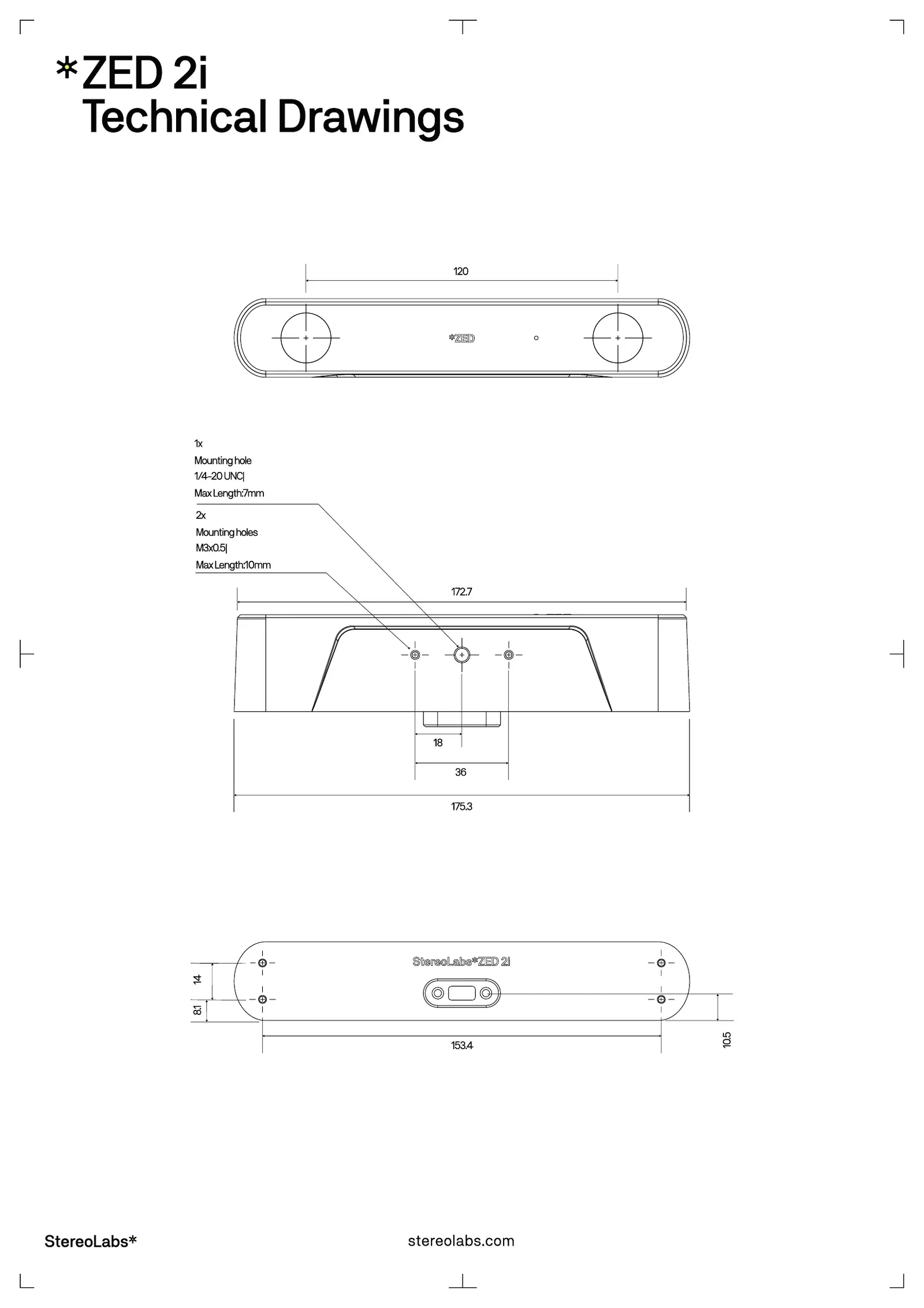
Technical drawings
ZED 2i
ZED Mini
System requirements
The ZED 2i and ZED Mini connect to the host over USB 3.0. See the Recommended Specifications for ZED SDK page for the up-to-date host requirements.
Minimum ZED SDK version
Part numbers
Standards and compliance
The compliance certificates are available on the StereoLabs certificates page.