

Tutorial - Subscribe to the ZED point cloud with CUDA zero-copy
This tutorial explains how to receive the ZED point cloud directly in GPU memory with the CUDA zero-copy transport of ROS 2 Lyrical, and how to read the coordinates of its points in your own accelerated ROS 2 node.
The example creates a ROS 2 component that subscribes to the ZED point cloud twice: first accepting only standard CPU data, then accepting the CUDA buffers published by the ZED node. For each received point cloud, it reads the point in the middle of the cloud on the GPU and prints its coordinates. At the end, it compares the latency, the frame rate, and the CPU and GPU load of the two methods.
This tutorial is the point cloud version of the image CUDA zero-copy tutorial. Read the CUDA zero-copy transport page first for an introduction to how the transport works, and the image tutorial for the API used to read the CUDA buffers.
Set up the example
-
Set up the CUDA zero-copy transport in your Isaac™ ROS 5 environment by following the Set up the CUDA zero-copy transport section: install the
cuda_bufferpackage, build thecuda_buffer_backendplugin, and build the ZED ROS 2 Wrapper. -
If the ZED ROS 2 Examples are not in your workspace yet, clone them in the
srcfolder: -
Build the example:
Read the point cloud on the GPU
The example node is a ROS 2 component implemented in C++, in the folder isaac_ros/isaac_ros_5/zed_isaac_ros_cuda_pc_sub/src/component of the ZED ROS 2 Examples repository. The component is the class ZedCudaPcSubComponent, which inherits from rclcpp::Node.
Subscribe to the point cloud
The subscription is a standard sensor_msgs/msg/PointCloud2 subscription. As for the images, the acceptable_buffer_backends option declares whether the node accepts the CUDA buffers:
The data field of a PointCloud2 message is a rosidl::Buffer like the data field of an image: when the subscription accepts the cuda backend, the point cloud stays in the GPU memory of the ZED node.
As for the images, _defaultQoS keeps only the latest message (history depth 1): read the warning about the queue depth in the image tutorial.
Find the X, Y, and Z coordinates in a point
Each point of the cloud is a block of point_step bytes. The fields of the message describe where each value is stored in the block. The node reads the offsets of the x, y, and z fields from the first message:
The ZED point cloud stores the x, y, z, and rgb values of each point as 32-bit floats, in a block of 16 bytes. Reading the offsets from the message keeps the node working with other point cloud layouts.
Read the middle point
The ZED point cloud is organized like an image: height rows of width points, with row_step bytes per row. The node computes the position of the middle point in the buffer, then copies that point from GPU memory and extracts its coordinates:
The dev_ptr device pointer comes from a cuda_buffer_backend::ReadHandle when the message is CUDA-backed, or from GPU memory where the node uploads the point cloud when it receives CPU data, exactly as in the image tutorial. In a real application, replace the process lambda with your CUDA kernels, which can work on all the points of the cloud without copying them.
When the voxelized point cloud of the ZED node is enabled (depth.voxel_point_cloud), the cloud is unorganized: a single row of points (height is 1), and the “middle point” is the point in the middle of the list.
Invalid points
The coordinates of a point are NaN when the depth is not available for it, for example when the surface is too close, too far, or not textured enough. The node checks the coordinates before printing them:
The coordinates are expressed in meters, in the frame of the point cloud message (header.frame_id, by default <camera_name>_left_camera_frame), with the ROS convention: X forward, Y left, Z up.
How the example works
The node runs the same two benchmark phases as the image example, on the point cloud:
- CPU: the subscription accepts only CPU data. The middleware copies the point cloud from GPU to CPU memory, and the node uploads it back to GPU memory to read it.
- CUDA: the subscription accepts the
cudabackend. The node reads the GPU memory of the ZED node directly, without copies.
Where the CUDA zero-copy transport makes the difference
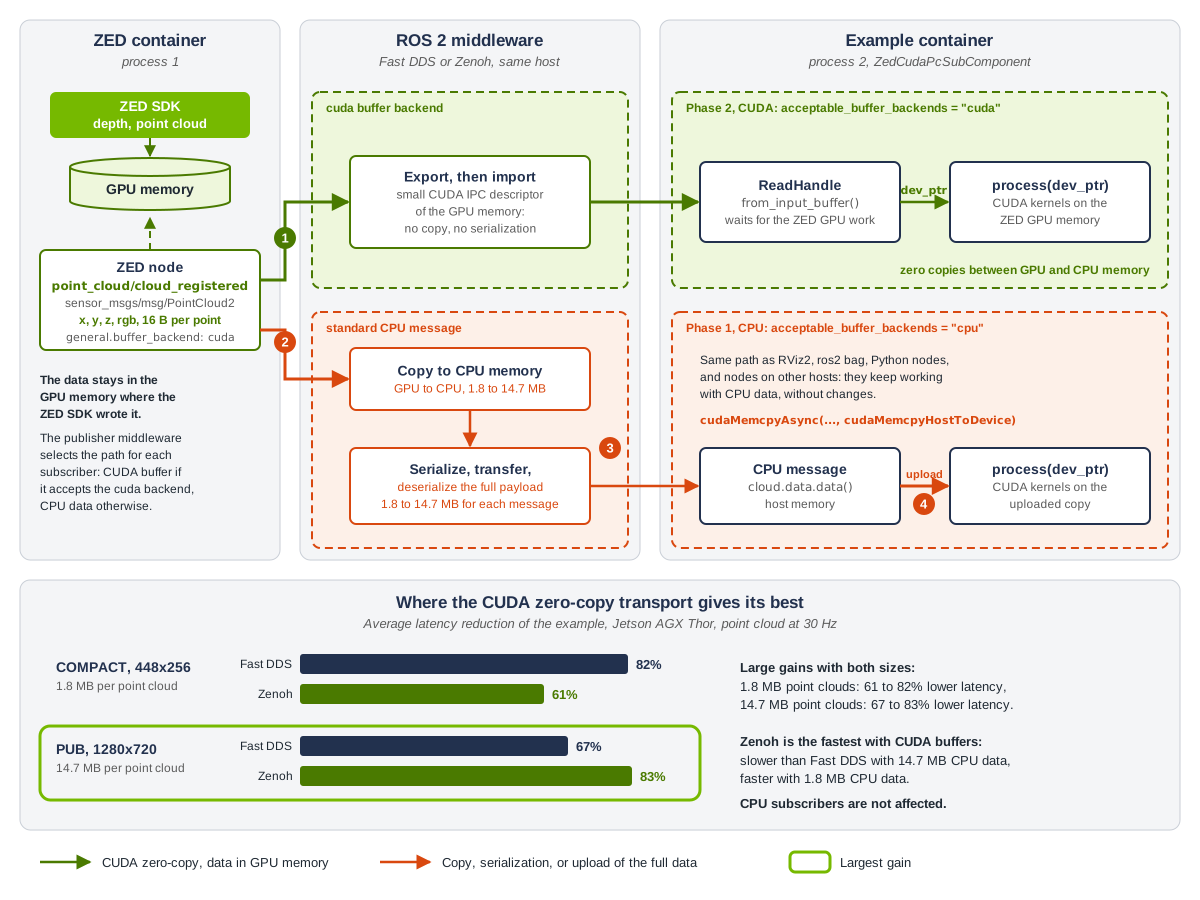
Figure 1: the two benchmark phases of the example. Green arrows carry data in GPU memory, orange arrows mark the copies, the serialization, and the upload of the full point cloud.
The numbers below match the badges of Figure 1.
- CUDA phase (cross-process). The middleware sends only a small descriptor of the GPU memory where the ZED SDK wrote the point cloud. The example node maps the same memory and reads it through a
ReadHandle: the point cloud is neither copied nor serialized. - CPU phase, copy to CPU memory. The subscription does not accept the
cudabackend, so the publisher middleware copies the full point cloud from GPU to CPU memory: 1.8 MB with theCOMPACTresolution, 14.7 MB with thePUBresolution at HD720. - CPU phase, serialization and transfer. The middleware serializes the full point cloud, transfers it to the example process, and deserializes it.
- CPU phase, upload. The example node uploads the point cloud back to GPU memory with
cudaMemcpyAsyncbefore reading it.
The bottom of Figure 1 shows the latency reduction measured with the example (see Fast DDS and Zenoh): 61 to 83% with both point cloud sizes. With the PUB resolution, the point cloud is 4 times larger than the bgra8 image of the same resolution, and the CUDA zero-copy transport gives its best with Zenoh: 83% lower latency. The subscribers that read CPU data, such as RViz2, ros2 bag, and Python nodes, keep following the CPU path and are not affected.
Each phase receives the number of messages set by the parameter benchmark.tot_samples, prints the coordinates of the middle point of each message, and measures the latency, the period between two messages, and the CPU and GPU load of the whole system. At the end of the CUDA phase, the node prints the results, compares the two phases, saves them in the CSV file set by the parameter benchmark.csv_log_file, and shuts down.
Advanced configuration of the example
The folder config contains the file example_params.yaml with the parameters of the example.
The sections general and depth override the configuration of the ZED ROS 2 Wrapper node:
general.grab_resolution: The native camera grab resolution. ‘HD1200’, ‘HD2K’, ‘HD1080’, ‘HD720’, ‘SVGA’, ‘VGA’, ‘AUTO’.general.buffer_backend:cudato publish the point cloud with the CUDA zero-copy transport,cputo always publish CPU data.depth.point_cloud_freq: Frequency of the point cloud publishing,30.0by default. It must be lower than or equal to the camera frame rate.depth.point_cloud_res: The resolution of the point cloud. ‘COMPACT’ (default) for the standard resolution, ‘REDUCED’ for half resolution, ‘PUB’ for the same resolution as the published images.
The section benchmark configures the benchmark:
tot_samples: Number of samples to process for each benchmark phase, from1to1000,300inexample_params.yaml.cpu_gpu_load_period: Period in milliseconds to retrieve CPU and GPU load statistics, from10to1000.cpu_gpu_load_avg_wnd_size: Number of samples to use to compute the average CPU and GPU load, from1to100.csv_log_file: If not empty, log the benchmark results in a CSV file with the specified name.
A value out of range or of a wrong type is ignored: the node logs a warning with the valid range and uses its built-in default value.
The section debug is used to debug the nodes:
debug_cuda: Enable the debug information of the example.use_pub_timestamps: If true, the ZED node sets the timestamps of the messages to the system time just before publishing, to measure the communication latency. If false, the latency is measured from the time the data is grabbed from the camera.
The time saved by the CUDA zero-copy transport grows with the size of the data and with the publishing rate. To compare the two transports with larger point clouds, set depth.point_cloud_res to 'PUB'.
Run the example
Launch the example, replacing <camera_model> with the model of your camera:
By default, the example subscribes to the /zed_isaac/zed/point_cloud/cloud_registered topic. Use the topic_name argument to subscribe to another point cloud topic.
To run the example without a camera, use the svo_path argument to replay an SVO recording. Use the camera_model of the camera that recorded the file. The SVO file is not replayed in a loop: for the benchmark to complete, it must contain more than two times benchmark.tot_samples frames, 600 frames by default, because a few frames are lost when the subscriber connects and when it changes phase. Record at least 30 seconds at 30 FPS:
The launch file is the same as the one of the image example: it starts the ZED node and the example node in two different component containers, /zed_isaac/zed_container and /zed_isaac/cuda_sub_container, and disables the Intra-Process Communication of the ZED node so that it always publishes the CUDA buffers.
Example output
All the benchmark results on this page were measured on an NVIDIA® Jetson™ AGX Thor Developer Kit in the MAXN power mode, with jetson_clocks running, using a ZED 2i camera. See how to set them in Set up the compute platform. The results depend on the platform, its power mode, and its clock settings.
We executed the example with the camera at HD720 @ 60 FPS, with the point cloud published at 30 Hz. For each received point cloud, the example prints the buffer backend of the message and the coordinates of the middle point. This is the output with the PUB point cloud resolution:
The middle point is about 71 cm in front of the camera, on its optical axis: Y and Z are close to zero.
When the depth is not available for the middle point, the coordinate line is Middle point: invalid (no depth).
At the end of the benchmark, the example prints the comparison of the two phases. These are the average values that we measured with Fast DDS, in two runs with each point cloud resolution:
Both transports keep the 30 Hz publishing rate. With the CUDA zero-copy transport:
- The latency is lower: about 82% with the
COMPACTpoint cloud, and 67% with the largerPUBpoint cloud, because the copies between GPU and CPU memory and the serialization of the point cloud to send it to the process of the subscriber are not required. - The latency is more stable: its standard deviation is 6 to 25 times lower.
- The CPU and GPU loads are similar. These values are measured on the whole system, including the ZED SDK, so they vary between runs: compare the two phases of the same run.
The results also depend on the camera, the resolution, the publishing rate, and the load of the system.
Fast DDS and Zenoh
All the benchmark results on this page were measured on an NVIDIA® Jetson™ AGX Thor Developer Kit in the MAXN power mode, with jetson_clocks running, using a ZED 2i camera. See how to set them in Set up the compute platform. The results depend on the platform, its power mode, and its clock settings.
The CUDA zero-copy transport works with both the rmw_fastrtps_cpp (Fast DDS) and the rmw_zenoh_cpp (Zenoh) middleware: see Use Zenoh with Isaac™ ROS 5. We measured both middlewares with the Bare Metal installation, in two runs of each configuration. Zenoh used the recommended setting for large messages, with the default configuration otherwise (shared memory disabled). Fast DDS used its default configuration. The camera ran at HD720 @ 60 FPS, with the point cloud published at 30 Hz. These are the average latencies of the example:
With both middlewares, all the point clouds were received as CUDA buffers in the CUDA phase, at 30 Hz, and the system CPU and GPU loads were similar.
The two middlewares behave differently with CPU data and with CUDA buffers:
- With CPU data, the result depends on the size of the messages. With the large
PUBpoint cloud, Fast DDS has the lowest latency: 4.9 - 6.4 ms against 9.7 - 10.0 ms with Zenoh. With the smallCOMPACTpoint cloud, Zenoh has a lower and more stable latency: 1.8 ms against 3.6 - 4.9 ms with Fast DDS, whose latency varies a lot (standard deviation of about 5 ms). Prefer Fast DDS when most of the subscribers of the ZED topics read large CPU data, such as RViz2,ros2 bag, or Python nodes. - With the CUDA zero-copy transport, Zenoh has the lowest latency: 1.7 ms against 1.9 ms with Fast DDS for the
PUBpoint cloud. Consider it when the subscribers of the ZED topics are mainly accelerated nodes, or when you need its network features, such as the discovery without UDP multicast.
Conclusion
This tutorial showed how to receive the ZED point cloud directly in GPU memory with the CUDA zero-copy transport of ROS 2 Lyrical, and how to locate a point and its coordinates in the buffer of a PointCloud2 message.
The same approach applies to any processing of the point cloud on the GPU: launch your CUDA kernels on the GPU memory of the message, and benefit from a lower and more stable latency, with both small and large point clouds.