

Using GNSS with ZED Box
The GNSS module is an optional component of the ZED Box with Orin NX. It provides the global position used by the ZED SDK Global Localization module and, with Real-Time Kinematic (RTK) corrections, reaches centimeter-level accuracy, significantly improving upon the few-meter accuracy of standard GNSS. This makes it ideal for applications that require highly precise positioning, such as autonomous vehicles, surveying, and precision agriculture.
If you are new to GNSS, read the GNSS Overview first: it explains what GNSS, RTK and NTRIP are, and how to mount the antenna.
Installation
Antenna
The GNSS module needs an antenna with a male connector to get a signal. It must be plugged into port 5 on the side of the ZED Box.
You can use the antenna we sell in our store, or any other active GNSS antenna. However, the Wi-Fi antenna that also comes with the ZED Box will not work.
gpsd
The ZED Box is shipped with gpsd already installed, and started at boot by a cron job. The GNSS module is available as /dev/ttyACM0.
You can test that gpsd is working properly with the tool installed with gpsd:
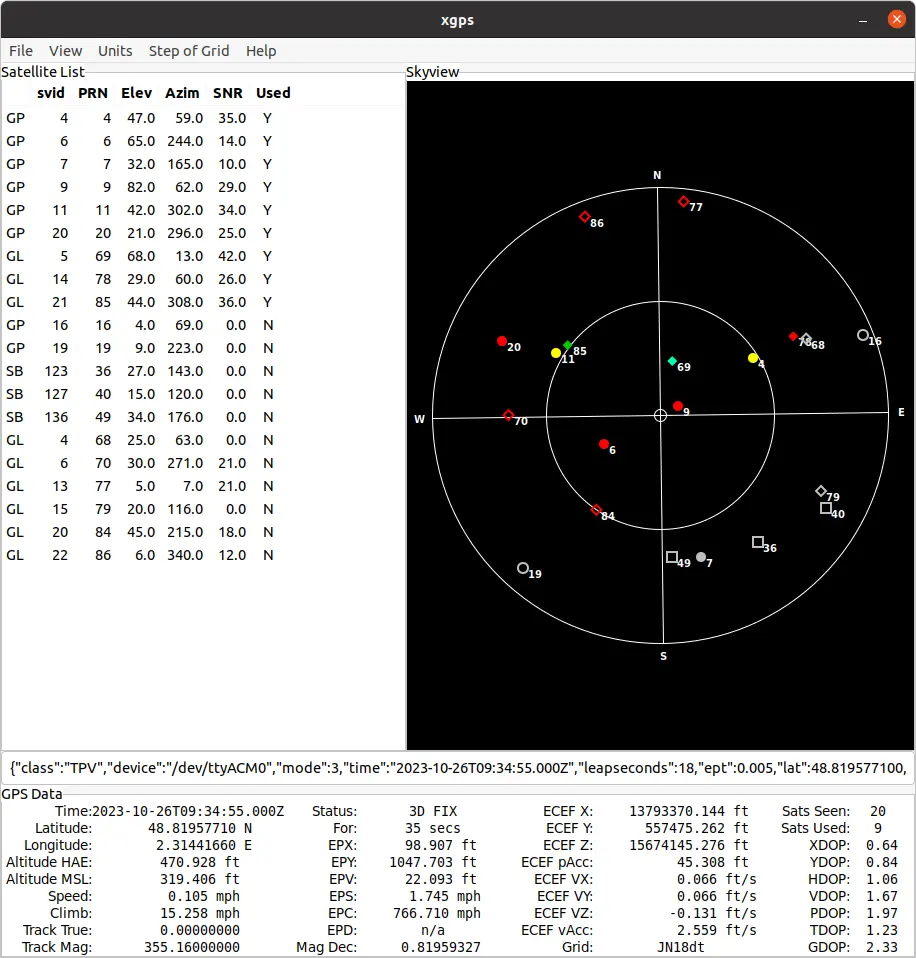
To check the raw data of the module, stream the content of its serial port:
The position fields stay empty until the module gets a fix, which requires the antenna to have a clear view of the sky.
If gpsd is missing from your ZED Box, for example after flashing a new system image, install it by following Setting up GNSS / RTK on Linux.
Enabling RTK on your GNSS module
Using NTRIP
gpsd can act as an NTRIP client to retrieve RTK corrections from a base station. Replace the placeholders of the command below with the caster <url> and <port>, the <mountpoint> of a base station less than 25 km away, and the <username> and <password> if the caster requires them.
Restart gpsd as an NTRIP client with:
You can now run xgps and wait for the GNSS to get an RTK fix. The ECEF pAcc value gives the 3D position accuracy: with an RTK FIX status, it should be a few centimeters.
Set RTK configuration at boot
To connect to the base station at every boot, edit the cron job that starts gpsd:
And replace the gpsd line already present with the following:
PPS signal
Besides the position data, the GNSS module provides a PPS (Pulse Per Second) signal, a hardware pulse emitted at the beginning of every UTC second, which can be used to synchronize the system clock with GNSS time. See Time Synchronization with PPS to learn why and when this is useful.
On the ZED Box, this signal is wired directly to the PA.06 GPIO of the NVIDIA® Jetson™ module and is handled by the standard Linux pps-gpio driver. PPS support is enabled by default: no device tree modification and no additional driver are required. The kernel exposes the signal as /dev/pps0:
To check that pulses are received, read the timestamp of the last pulse twice, one second apart. The counter after the # should increase:
The PPS signal is generated only when the GNSS module has acquired a valid fix. If no antenna is connected, or if the sky visibility is poor, no pulse is produced.
To discipline the system clock with the PPS signal, follow Synchronizing the system clock, using /dev/ttyACM0 and /dev/pps0 as devices. If you start gpsd at boot with the PPS device, move the cron job described above to the root crontab (sudo crontab -e), since reading the PPS device requires root privileges.
The PPS signal is not routed to an external connector of the ZED Box, so it cannot be used to trigger external hardware directly. Synchronization is instead achieved through the system clock: once the clock is disciplined by PPS, every timestamp generated on the device shares the same UTC-aligned time base.
Device tree configuration
The PPS input is declared in the device tree shipped with the ZED Box:
compatible = "pps-gpio"binds the pin to the Linuxpps-gpioclient driver, which is what creates the/dev/pps0device.TEGRA234_MAIN_GPIO(A, 6)is pin 6 of port A of the Jetson main GPIO controller, that isPA.06.GPIO_ACTIVE_HIGH, with noassert-falling-edgeproperty, means that the assert event reported by the driver is the rising edge of the pulse.
If you build a custom kernel or a custom device tree, for example when flashing a Real-Time Kernel, make sure that this node is preserved, otherwise /dev/pps0 will not be created.
Using GNSS in your applications
Your applications read the GNSS data from gpsd, in Python with gpsdclient or in C++ with libgpsmm, convert it to sl::GNSSData, and ingest it into the ZED SDK Fusion module. See Using GNSS Data in Your Application for code examples, and the Global Localization samples on GitHub for complete applications.