

CUDA Zero-Copy Transport
Starting with v5.6.0, the ZED ROS 2 Wrapper supports the rosidl::Buffer message fields of ROS 2 Lyrical and publishes the ZED data with the CUDA zero-copy transport: your accelerated ROS 2 nodes receive the images, the depth maps, and the point clouds directly in GPU memory, without copies. In Isaac™ ROS 5, this transport replaces NITROS, used with Isaac™ ROS 3.
This page explains how the transport works and how to set it up. The tutorials then show how to use it in your own nodes.
How the CUDA zero-copy transport works
In ROS 2 Lyrical, the uint8[] data field of messages such as sensor_msgs/msg/Image and sensor_msgs/msg/PointCloud2 is a rosidl::Buffer, whose memory can live on the GPU. The cuda buffer backend shares this GPU memory between a publisher and its subscribers without copies.
Without the cuda buffer backend, every message of a GPU-accelerated pipeline crosses the CPU memory, even when both nodes process the data on the GPU. The ZED node copies the data from the GPU to the CPU (1), the middleware serializes the full payload (2), the middleware of the subscriber deserializes it (3), and the subscriber copies it back to the GPU (4) before running its CUDA kernels:
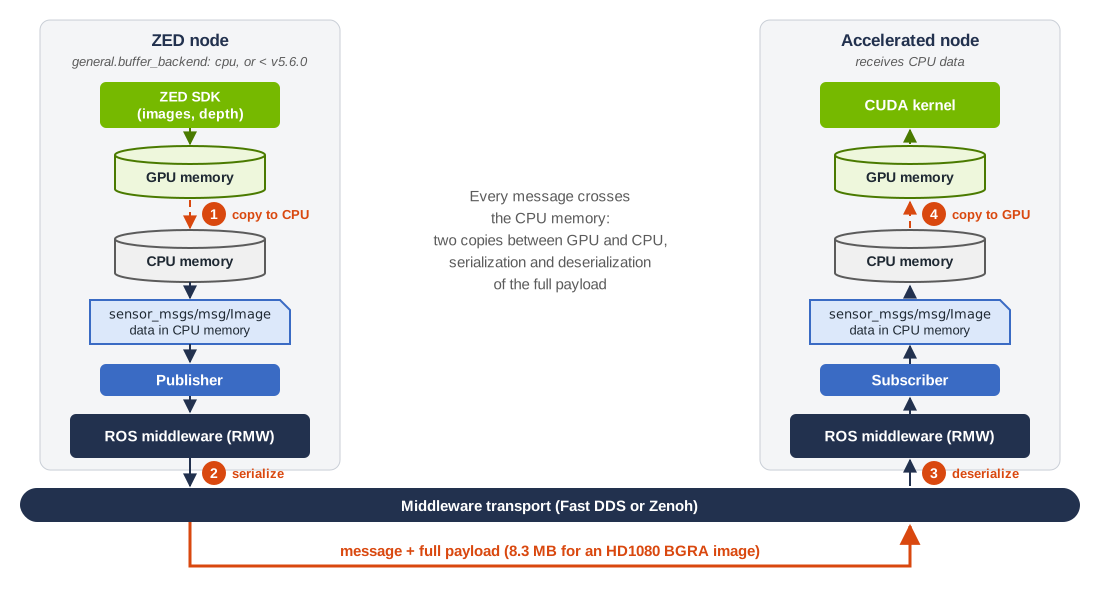
Figure 1: the CPU path, used by the ZED ROS 2 Wrapper before v5.6.0, or with general.buffer_backend: cpu.
With the cuda buffer backend, the data field of the message refers to the GPU memory filled by the ZED SDK. The middleware of the ZED node exports this memory as a small descriptor and sends it with the message. The middleware of the subscriber imports the descriptor and maps the same GPU memory, so the CUDA kernels of the subscriber read the data where the ZED SDK wrote it. The publisher middleware selects the transport for each subscriber: for the subscribers that cannot use the cuda backend, it copies the data to CPU memory and sends a standard message, so the ZED node does not need to know which subscribers accept CUDA buffers.
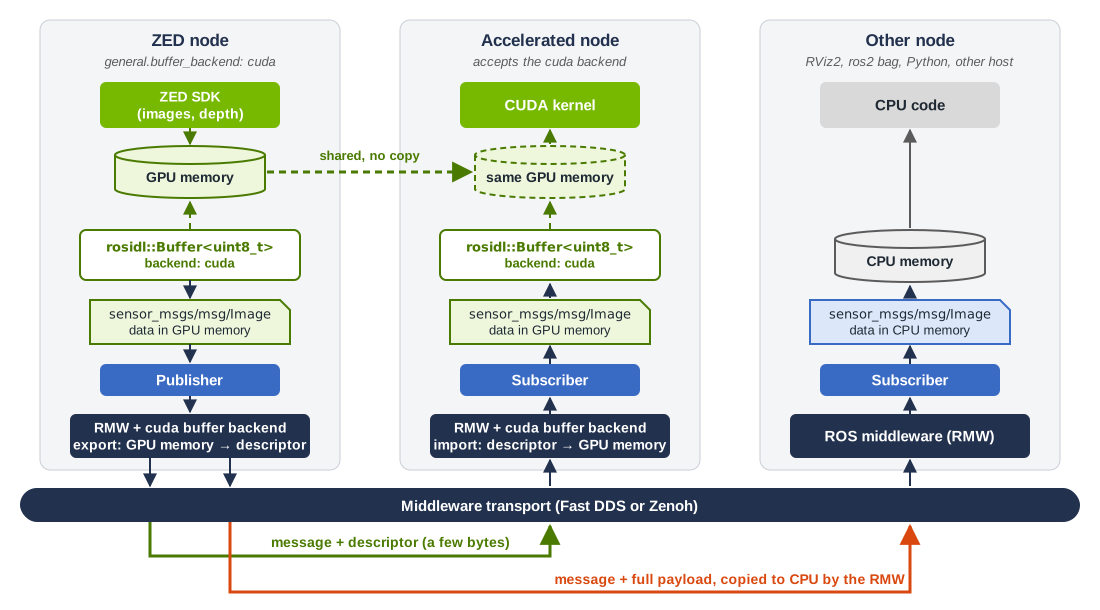
Figure 2: the CUDA zero-copy path, with the automatic CPU fallback for the other subscribers. Diagrams adapted from the NVIDIA® Technical Blog.
ZED data published with CUDA buffers
The ZED ROS 2 Wrapper publishes the images, the depth maps, the confidence maps, and the point clouds with CUDA buffers. The parameter general.buffer_backend controls this behavior: cuda (default) or cpu. See the ZED Stereo Node and the ZED Monocular Node documentation for details.
A subscriber receives the GPU memory of the ZED node only if it accepts the cuda backend and meets the requirements below. All the other subscribers, such as RViz2, ros2 bag, Python nodes, and nodes on other hosts, receive standard CPU data, with no change on their side.
The ZED node publishes standard CPU data, for all the subscribers of a topic, in these cases:
- An rclcpp Intra-Process Communication (IPC) subscriber is connected: IPC delivers the messages without the buffer backend negotiation, so it could hand GPU memory to a node that cannot read it. To receive CUDA buffers, disable IPC on the ZED node and load your nodes in a separate component container, as shown in the image tutorial.
- The topic uses the
TRANSIENT_LOCALdurability, not supported by thecudabackend. - A compressed
point_cloud_transportplugin is subscribed to the point cloud: the uncompressed point cloud is then published with CPU data too.
The compressed image_transport topics always carry CPU data, and do not change how the uncompressed image topics are published.
The CUDA zero-copy transport is not NITROS: there are no /nitros topics and no special publisher or subscriber classes. Your node subscribes to the standard ZED topics with a standard ROS 2 subscription, and declares that it accepts the cuda backend.
Requirements
- An Isaac™ ROS 5 environment with ZED support, set up by following the Setting up Isaac™ ROS 5 and Use ZED with Isaac™ ROS guides.
- The ZED ROS 2 Wrapper v5.6.0 or newer, built with the
cuda_bufferpackage installed. - The
cuda_buffer_backendplugin, built from source as described below. - The
rmw_fastrtps_cpp(Fast DDS) or thermw_zenoh_cppv0.10.5 or newer (Zenoh) ROS 2 middleware, as required by Isaac™ ROS 5: with other middleware implementations, or with an older version ofrmw_zenoh_cpp, the ZED node publishes standard CPU data. - The ZED node and the subscribers that receive the CUDA buffers must run on the same host, use the same GPU, and run as the same Linux user. With the Docker installation, run them in the same container.
- The nodes that process the ZED data on the GPU must subscribe with a history depth of
1, and run in a different process than the ZED node, for example in a separate component container. See the warning in the image tutorial for the details.
Set up the CUDA zero-copy transport
Run all the commands in the Isaac™ ROS environment. With the Docker installation, run isaac-ros activate to open a shell in the running container.
Install the cuda_buffer package
The ZED ROS 2 Wrapper enables the CUDA zero-copy transport only if it finds the cuda_buffer package when it is built.
Docker
Bare Metal
The Dockerfile.00-zed_sdk file of the Use ZED with Isaac™ ROS guide installs the package. If your file does not contain the ros-${ROS_DISTRO}-cuda-buffer package yet, add it to the apt-get install command of the second RUN instruction, so that it persists across container restarts:
Exit all the shells of the running container, then rebuild the image and start the container:
Check that the installed version comes from the Isaac™ ROS repository, which provides the build for CUDA 13.2. The output must contain cuda-cudart-13-2:
Build the cuda_buffer_backend plugin
The middleware uses the cuda_buffer_backend plugin to share the CUDA buffers between the nodes: both the publisher and the subscribers must load it. Build it from source in your workspace, with the version that matches the installed cuda_buffer package:
For version 0.1.2:
Only the cuda_buffer_backend package is copied in the workspace: the other packages of the repository are already installed, or are not required.
Do not install the ros-lyrical-cuda-buffer-backend Debian package. It is built for the NVIDIA® desktop drivers and the CUDA 12 runtime: on Jetson™ it tries to install desktop driver packages that conflict with JetPack and leaves the package manager in a broken state, and on x86_64 it installs a second CUDA toolkit.
Build the ZED ROS 2 Wrapper
-
If the ZED ROS 2 Wrapper is not in your workspace yet, clone it as described in Use ZED with Isaac™ ROS.
-
Build the wrapper. The
--cmake-clean-cacheoption makes sure that a wrapper built before installingcuda_bufferdetects it:The build output of the
zed_componentspackage must contain the line* rosidl::Buffer CUDA zero-copy transport is available. -
Start the ZED node and check its log. The CUDA zero-copy transport is active when the node prints:
Otherwise, the line explains why the node publishes standard CPU data, for example
the 'cuda' buffer backend plugin is not installed.
Use the CUDA zero-copy transport with Isaac™ ROS nodes
Isaac™ ROS 5 nodes subscribe to the standard ZED topics, as shown in the ZED test. Whether they receive the ZED data as CUDA buffers depends on how each Isaac™ ROS package configures its subscriptions, and on the version of the cuda_buffer library it is built with. To verify the transport of your pipeline, subscribe to the output topics of the Isaac™ ROS nodes with the image example, which logs the backend of each received message.
Your own nodes receive the CUDA buffers when they accept the cuda backend and read the data with the cuda_buffer API, as shown in the tutorials.
Set the input queue depth of the Isaac™ ROS nodes that receive CUDA buffers to 1. The input_qos_depth parameter sets the depth of the subscription. The nodes that synchronize an image with its camera info, such as ResizeNode, also have an input_queue_size parameter for the synchronization queue. Both are 10 by default. The cuda buffer backend can reuse the GPU memory of a message about 100 ms after it is published: a message taken late from a longer queue can no longer be read, and the node stops with a cuda_buffer_backend::CudaError exception. In our tests on a Jetson™ AGX Thor with a ZED 2i at HD1080 and 30 FPS, the Isaac™ ROS image format converter stopped in 1 of 5 runs of 150 seconds with its default queue depth, and in none of the runs with input_qos_depth set to 1. Read more in the warning about the queue depth of the image tutorial.
Next steps
- Subscribe to the ZED images with CUDA zero-copy: accept the
cudabuffer backend in a subscription, check the backend of each message, read its GPU memory, and compare the CPU and CUDA transports. - Subscribe to the ZED point cloud with CUDA zero-copy: apply the same approach to the
PointCloud2messages, and read the coordinates of a point on the GPU. - Object detection with Isaac™ ROS: see the CUDA zero-copy transport at work in a complete Isaac™ ROS pipeline, from the ZED images to the TensorRT inference.