

Using GMSL with ZED Box
The ZED Box comes with an embedded GMSL2 capture card, so you can use a ZED X or any other GMSL camera.
GMSL driver
The ZED X requires a GMSL driver. It comes already installed with the ZED Box.
You may need to install it manually, especially if you upgraded your system version. Go to our website and download the driver version that fits with your L4T version.
To find your Jetson Linux (L4T) version, run
You will obtain an output like this:
In this example, the L4T version is 35.4.1.
Then, open a terminal in the folder that contains the downloaded driver and run
and reboot.
Multi-camera configurations
ZED Box with 4-wire GMSL2 connectivity
The ZED Box provides 4 GMSL2 ports organized in 2 Groups (A, B):
- Group A: port #0 and port #1
- Group B: port #2 and port #3
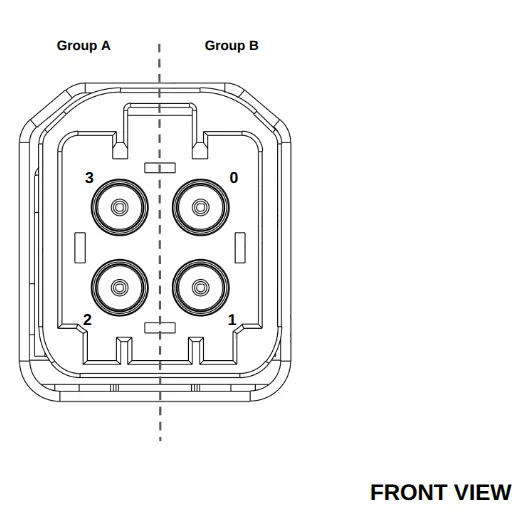
Please refer to the table below to understand how different camera configurations provide different image capture behaviors, according to the number of cameras, their type, and the Group they are connected to:
* Mixed configurations are not available with older versions of the ZED Box powered by Jetson Xavier NX modules.
Maximum resolution and framerate require no more than 2 cameras per 4-wire GMSL2 Fakra connector.
ZED Box with mono GMSL2 port (out of production)
This out of production version of the ZED Box provides a single GMSL2 port, so only one camera can be connected.
The table below illustrates the different behaviors that can be expected according to the camera type:
Developing your own driver
If you intend to use a GMSL device alongside a StereoLabs ZED X camera, a custom driver is required for compatibility.
In such cases, we recommend reaching out to our support team at support@stereolabs.com for more information and assistance.